
Why IT Teams Are Cautious About Online File Converters
Understand why unapproved online file converters create data-flow and vendor-review questions, when an approved cloud service can be reasonable, and where local Windows processing helps.
On this page
- The short answer
- One conversion request can use three different processing models
- Why a quick workaround becomes shadow IT
- The questions IT may not be able to answer afterward
- Security context: reviewed 26 October 2026
- Malware is a separate concern from data handling
- What local processing changes
- A practical decision matrix
- How LocalFlux approaches the boundary
- Give employees an approved path
- What a cautious approval actually looks like
- Frequently asked questions
- A better default for the next awkward file
An employee receives a document that will not open in the software used by a customer. The deadline is close, the document looks ordinary, and a search result offers a free converter that promises an answer in seconds. The employee uploads the file, downloads a new copy, and gets back to work.
The conversion may have succeeded. The organization may still be unable to answer basic questions: Which company received the source file? Where was it processed? What terms applied at the time? How long might temporary copies, logs, or backups remain? Was that provider approved for the information inside the document?
That uncertainty is why IT and security teams are cautious about unapproved online file converters. Their concern is not that every web tool is malicious or every work file is secret. The concern is that a small compatibility task can quietly become a new data-handling relationship.
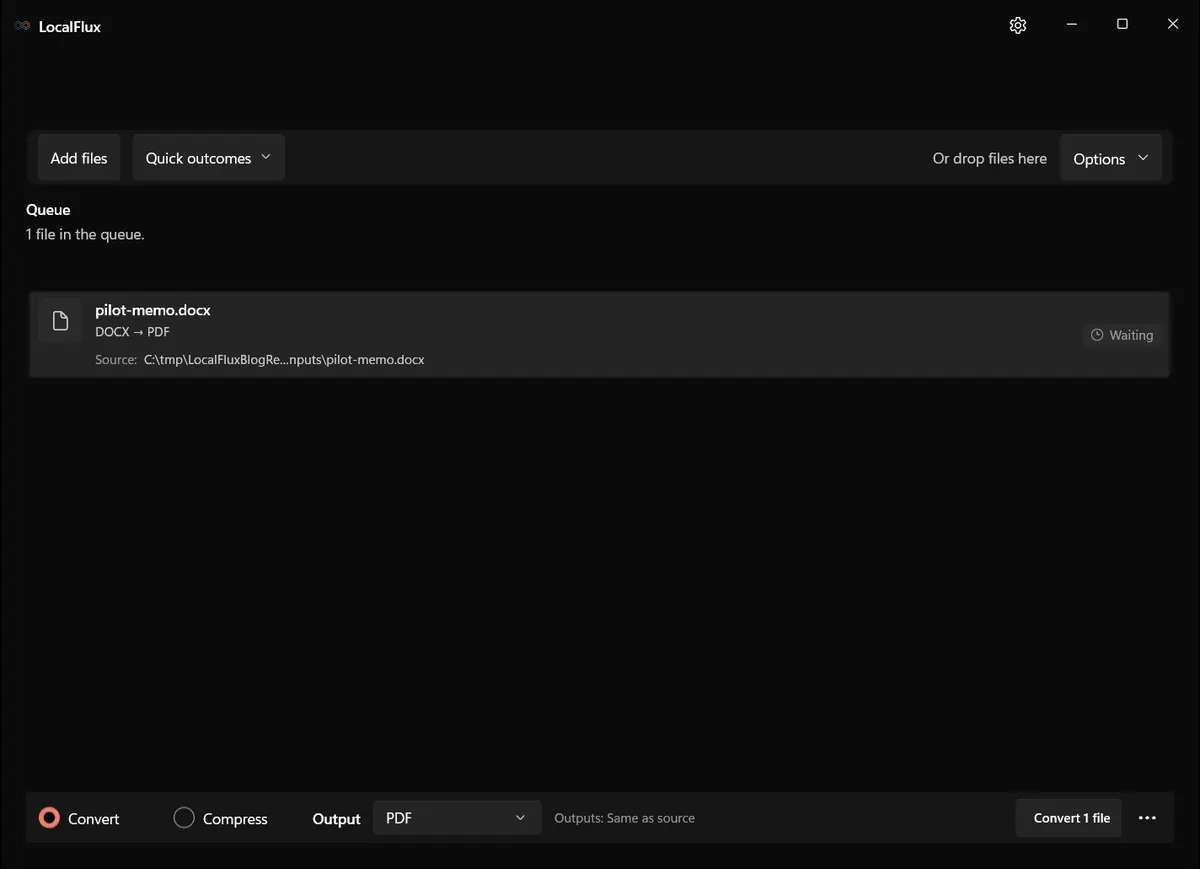
Interface screenshots were refreshed in October 2026 using a build reconstructed from the documented LocalFlux 1.0.10.0 release source. Historical measurements and downloads below retain their original test scope. Capture records: 1
Evidence checked on 13 October 2026: the public Trust Center identifies build 1.0.7.0. Earlier editorial tests used a retained 1.0.8.0 x64 package. The refreshed screenshots use new synthetic fixtures and a build reconstructed from the documented 1.0.10.0 x64 release source; their records are linked beside the illustrations. These functional observations are not Store certification, release authorization, clean-VM or ARM64 evidence, or a network test. Recheck the current Store listing and evidence before making a purchasing decision.
The editorial test uses a self-authored document in a neutral local folder. Never use real customer, employee, legal, medical, or financial data when evaluating an unfamiliar utility.
The short answer
Upload-based converters need the source file to reach their infrastructure before they can process it. That adds a provider, a network transfer, and a set of terms to what looked like a local formatting problem.
An approved online service may be entirely reasonable when its operator, retention practices, security controls, contracts, and intended use have been reviewed. A local desktop converter changes the data path by keeping supported processing on the workstation, but it does not automatically make the complete workflow secure or compliant.
The practical IT goal is therefore not “ban every converter.” It is:
- understand the processing model;
- match the model to the information involved;
- give employees an approved way to finish legitimate work; and
- verify the tool rather than trusting a label such as private or offline.
One conversion request can use three different processing models
The phrase “online converter” can hide materially different designs. Before making a policy decision, identify which model is actually in use.
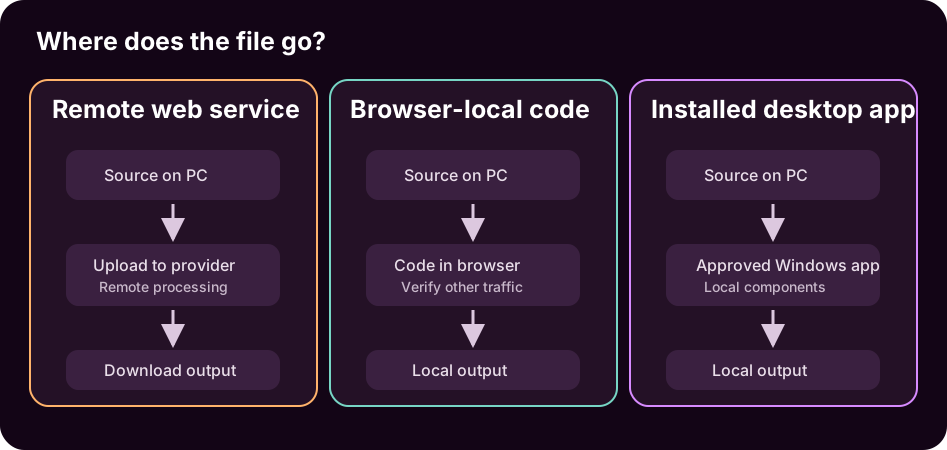
Remote upload and processing
The browser transfers the source to a provider-controlled system. The service processes it remotely and returns an output. The provider may also operate temporary storage, logging, abuse detection, backups, analytics, or support systems.
This model can be legitimate and well controlled. It can also require review because the source leaves the managed endpoint. HTTPS protects the transfer in transit; it does not, by itself, explain retention, access, secondary use, incident handling, or deletion after the upload arrives.
Local processing inside a browser
Some websites load conversion code into the browser and process the file on the device. The user experience still looks like a website, but the source may not be uploaded for the conversion itself.
That can reduce the data shared with a processing server, but the claim still needs verification. The page is delivered over the network, can change between visits, and may use analytics or other services. IT should distinguish “the conversion ran in this browser” from the broader statement “nothing about the session communicated externally.”
Installed desktop processing
An installed application can use local conversion components and write the output directly to local storage. Normal processing may continue without connectivity when the required engines are packaged with the application.
Desktop software still needs review. Distribution, signing, updates, bundled components, local logs, permissions, output locations, and licensing all matter. Local processing removes a remote conversion step; it does not remove endpoint, user, storage, malware, backup, or delivery risks.
Why a quick workaround becomes shadow IT
Shadow IT is usually a symptom before it is a discipline problem. The employee is blocked by a format, size limit, or compatibility requirement. If the approved toolset does not solve the task, the quickest visible service becomes the practical fallback.
The business need is real:
- a proposal must become PDF before a customer review;
- phone photos must become JPG before entering a case or content system;
- a large video must fit an approved portal limit;
- a legacy spreadsheet must open in current software; or
- an audio recording must become a format accepted by an editing or transcription workflow.
Simply telling people not to use converters leaves every one of those problems in place. Effective guidance pairs a boundary with an approved path: which files may use which services, which local tool covers routine routes, how outputs are checked, and where employees should escalate unsupported work.
The NIST Cybersecurity Framework supply-chain guide encourages organizations to define supplier requirements and perform due diligence before relying on technology products and services. An improvised converter upload bypasses that deliberate review, even when the employee’s intent is harmless.
The questions IT may not be able to answer afterward
When a service has not been reviewed, the organization may lack reliable answers in five areas.
Operator and jurisdiction
The site name may not clearly identify the legal operator, processing locations, or applicable contractual entity. A polished interface is not evidence of accountable ownership.
Retention and deletion
“Deleted shortly after conversion” can mean deletion from a working system, not necessarily every log, cache, support copy, or backup. IT needs the provider’s actual terms, not an assumption based on a download disappearing.
Access and secondary use
The relevant question is not only whether the public can see the result. It is also whether provider staff, subprocessors, automated analysis systems, or support tooling can access file content, filenames, or associated metadata, and for what purpose.
Security and incident handling
The organization may need information about encryption, isolation, monitoring, vulnerability management, incident notice, and remedies. Those controls can be proportionate for a reputable service, but an unreviewed upload gives the organization no opportunity to decide.
Contractual and regulatory fit
A contract, NDA, client instruction, professional duty, or internal classification policy may restrict external processing. The important fact is not that the operation was “only conversion.” The relevant fact is whether another party received or processed the information.
The EU General Data Protection Regulation, for example, includes data-minimisation and security principles in Article 5. Those principles do not prohibit cloud conversion, and they do not certify local software. They reinforce the need to make processing deliberate and proportionate.
Security context: reviewed 26 October 2026
Three disclosures published on 21 October concern different risks:
- OpenAI described AI-assisted defensive discovery of critical PHP flaws and maintainer-led fixes. OpenAI
- Microsoft attributed AI-assisted activity in the ConnectWise compromise to Storm-0940. Microsoft
- Railway reported possible exposure of customer secrets; its disclosure does not establish AI causation. Railway
These reports are a reason to review necessary uploads, application permissions and update responsibilities—not evidence that every converter is compromised. LocalFlux is a file converter, not a cyber-defense product: keeping a supported conversion local avoids that upload, but does not prevent hacking, ransomware or all data leakage. Local software and the Windows device still need maintenance.
Malware is a separate concern from data handling
Provider privacy is only one part of the review. In March 2025, the FBI Denver Field Office warned about malicious online converter and downloader tools that delivered malware in resulting files.
That warning does not establish that every online converter is unsafe. It does show why IT teams care about the complete chain: the website, advertising and download experience, produced file, publisher identity, and endpoint protection. A service can create privacy questions without distributing malware, and malware can be delivered even when the uploaded source was public.
Avoid fear-based policy. Give employees specific signals:
- use only approved services and installed applications;
- avoid confusing download buttons, extensions, or bundled installers;
- verify the publisher and distribution source;
- scan and open outputs according to endpoint policy; and
- report unexpected prompts or behavior rather than retrying across random sites.
What local processing changes
For supported routes, a local converter can remove the step in which the source is transferred to a conversion provider. The path becomes easier to describe:
Source on the Windows PC
        ↓
Installed conversion application
        ↓
Bundled local conversion component
        ↓
New output on the Windows PC
That narrower path can help when a business wants to avoid unnecessary third-party processing, work during unreliable connectivity, preserve original files, or give staff a consistent routine.
It does not answer every security question. The device still needs appropriate access control, patching, anti-malware protection, encryption where required, backup, retention, and physical security. Users must still select an appropriate output, inspect it, and deliver it through an approved channel.
Local conversion also does not remove sensitive content. Changing DOCX to PDF does not redact names. Changing an image format does not necessarily remove EXIF, GPS, IPTC, or XMP metadata. Compressing a file does not anonymize it. Those are separate operations with separate verification requirements.
A practical decision matrix
| File situation | Reasonable default | Questions before proceeding |
|---|---|---|
| Already public, low-impact asset | Approved cloud or local tool may be reasonable | Is the site genuine, and is the output safe to download? |
| Routine internal file | Prefer an approved tool with a known processing model | Does policy allow external processing for this classification? |
| Confidential client or employee file | Avoid an unnecessary external upload | Is there an approved local route, and how will the output be reviewed? |
| Regulated or contract-controlled file | Follow the organization’s approved workflow | Which safeguards, agreements, records, and reviewers are required? |
| Prohibited or highly restricted file | Do not improvise | Who owns the decision, and what specialist system is required? |
This table is a starting point, not a universal classification policy. The organization’s own rules control.
How LocalFlux approaches the boundary
LocalFlux is an installed Windows utility for explicit image, audio, video, and document routes. According to the public LocalFlux Trust Center, supported conversion, compression, and privacy-safe image processing run on the Windows device without sending the selected source or output file to Fuzzysense for conversion.
The distinction is deliberately narrow:
- Microsoft Store installation, licensing, payments, and updates may communicate with Microsoft services.
- Links opened by the user can launch a browser and contact their destinations.
- Local settings, failure records, and crash logs may remain on the device until the user removes or shares them.
- Bundled engines do not mean every conceivable route is supported; the Formats directory defines the exposed routes.
- LocalFlux is not a DLP system, records manager, document editor, secure-deletion tool, or centrally managed enterprise platform.
The retained LocalFlux 1.0.8.0 x64 package used for this article created a separate PDF from a synthetic DOCX file and left the source hash unchanged. That editorial reproduction supports the specific workflow shown here. It is not an independent security audit or a guarantee about every input.
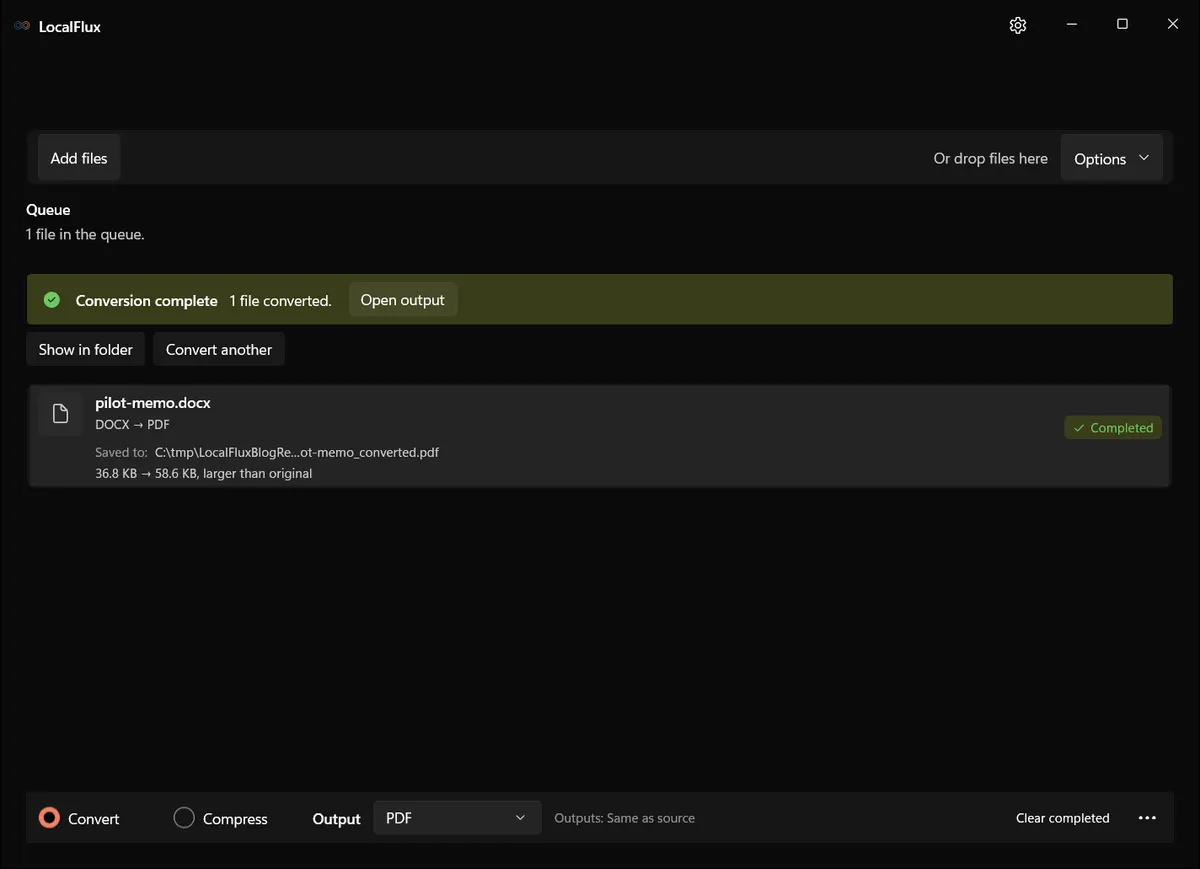
The source remained in place and the output received a separate name. The complete build identity, hashes, and limitations are retained with the editorial evidence package.
There is also an explicit network exception: sending feedback transmits the message and optional reply email; it does not automatically attach conversion files or diagnostic logs. Store installation, licensing and updates, and web links opened by the user, are separate from conversion. Local logs remain on the device, and sync or backup software can copy files independently. See the privacy policy.
Give employees an approved path
A useful converter policy can fit on one page:
- Identify the file classification and intended recipient.
- Use the organization’s approved service or local utility.
- Confirm the exact source-to-output route before processing.
- Preserve the source and write the result to a working folder.
- Open the result in the destination application and inspect it.
- Deliver only through an approved channel.
- Retain or remove working copies according to policy.
- Escalate unsupported, signed, encrypted, regulated, or unusually sensitive files.
The policy works because it solves the employee’s problem as well as the organization’s risk problem.
What a cautious approval actually looks like
Caution should end in a usable decision, not an indefinite “no.” A proportionate approval names the tool or service, permitted format routes, permitted information classes, expected output location, verification steps, and the person who owns exceptions. It also records what was not evaluated. That gives staff an answer they can apply at the moment a file blocks their work.
For example, an organization might approve a local DOCX-to-PDF route for ordinary internal proposals on managed Windows workstations, require an independent page review before delivery, and prohibit the route for signed agreements or documents containing restricted personal data. Public marketing images might be allowed through an approved cloud service, while confidential client material stays on a reviewed local workflow. These are operational boundaries, not claims that one architecture is universally safer.
The decision should also have a review date. Revisit it when the application, publisher, privacy terms, processing components, Store listing, required formats, or organizational data rules change. A narrow approval with visible owners is easier to defend and maintain than a vague instruction to “use good judgment.”
Frequently asked questions
Are online file converters unsafe?
Not categorically. A reputable service with appropriate controls, transparent terms, and organizational approval can be suitable. The problem is sending work files to a service before its processing model and terms have been reviewed.
Is a local converter automatically secure or compliant?
No. Local processing changes where conversion occurs. Security and compliance still depend on the application, endpoint, user, data, storage, delivery, contractual requirements, and organizational controls.
Does HTTPS solve the concern?
HTTPS protects data while it travels between the browser and service. It does not define what the provider does after receiving the file or how long related data remains.
Does conversion remove confidential information or metadata?
Not reliably. Content redaction, anonymization, and metadata removal are separate tasks. Use a documented feature for the required task and verify the finished copy.
A better default for the next awkward file
IT caution is not an objection to getting work done. It is a request to make the data path visible and intentional.
For public material, an approved online converter may be the most convenient choice. For client, company, or contract-controlled material, a vetted local route can remove an unnecessary upload while keeping the source and output under the organization’s existing endpoint controls.
Before using any converter for real work, map the processing path, confirm the exact route, test with a synthetic file, and follow the organization’s approval process.
Review how LocalFlux handles files or start a Microsoft Store trial with non-sensitive sample data.