
How to Evaluate a File Converter for Business Use: A Windows Security and Privacy Checklist
A practical Windows checklist for evaluating file-processing boundaries, telemetry, supported formats, failure behavior, updates, evidence, and business deployment limitations.
On this page
- Why a small utility deserves a proportionate review
- 1. Draw the normal file-processing path
- 2. Separate conversion traffic from platform traffic
- 3. Inventory accounts, analytics, crash reports, and diagnostics
- 4. Confirm exact supported routes
- 5. Verify original preservation and output naming
- 6. Test failure behavior, not only successful output
- 7. Inspect bundled components and notices
- 8. Verify package identity, publisher, and update channel
- 9. Check permissions and application capabilities
- 10. Review local storage, temporary files, and cleanup
- 11. Define output acceptance checks
- 12. Evaluate the commercial and management model
- A compact evaluation scorecard
- Worked example: what LocalFlux can and cannot establish
- Turn the checklist into a controlled pilot
“Works offline,” “private,” and “secure” sound reassuring on a product page. None of them is a complete answer to an IT review.
A business needs to know what the application actually does: where source bytes travel, which processes handle them, what remains on the device, which services receive telemetry, how updates arrive, what happens when a job fails, and whether the purchasing and management model fits the organization.
This checklist is designed for small-business owners, IT generalists, security reviewers, and procurement staff evaluating a Windows file converter. It is vendor-neutral. LocalFlux appears as a worked example because its processing boundary and product limitations are publicly documented.
Short answer: begin with the file path, not the marketing label. Require evidence for normal processing, network exceptions, original preservation, supported routes, diagnostics, failure behavior, bundled components, updates, and commercial deployment. Then reproduce the important claims with synthetic files.
Why a small utility deserves a proportionate review
A file converter may not have access to an organization’s identity platform or database, but it receives files chosen by users. Those files can contain customer information, contracts, unreleased media, payroll exports, presentations, research, or internal plans.
The NIST Cybersecurity Framework 2.0 supply-chain guide treats due diligence and supplier requirements as part of acquiring technology products and services. That does not mean every desktop utility requires an enterprise-scale assessment. It means the depth of review should match the data, deployment, and business impact.
For a self-managed workstation utility, a useful review can often be completed with public documentation, a controlled pilot, and a clear decision about permitted file classifications.
1. Draw the normal file-processing path
Ask the vendor to describe the ordinary route from source to output. A useful answer names each boundary:
Source location → application → conversion component → temporary location → output locationFor a remote service, identify the receiving organization, processing region, storage, deletion, logs, and subprocessors. For local software, identify the executable processes, bundled engines, temporary folders, output folders, and any child processes.
Do not accept “local” as a substitute for the map. A product may process the file locally while still sending analytics, checking licenses, opening web help, downloading components, or using a cloud-only feature. Those behaviors may be legitimate, but they should be separated from the core file route.
Evidence to request: a data-flow diagram, privacy policy, trust page, technical documentation, or a reproducible observation procedure.
2. Separate conversion traffic from platform traffic
An honest offline claim needs boundaries. Microsoft Store installation, payment validation, licensing, and updates can use Microsoft services. Windows, antivirus, browsers, and other background applications can create their own traffic. A website link opened from an application contacts the linked destination.
The important question is narrower: during the supported job, does the application send the selected source or output file to a vendor conversion service?
Test attribution at the process level. A blank network graph is not enough if the reviewer cannot identify which process was observed. One successful route also does not prove every route or future version.
Evidence to request: named processes, documented exceptions, an offline test, and the exact application version.
Include the converter’s child processes in network observations. Test optional feedback separately: LocalFlux sends the written message and optional reply email when requested, without automatically attaching conversion files or logs. Record Store/browser traffic separately and check whether the working folder is synchronized. The privacy policy describes these boundaries.
3. Inventory accounts, analytics, crash reports, and diagnostics
Ask four separate questions:
- Is an account required to process files?
- Does the application send usage analytics or advertising identifiers?
- Are crash or failure records uploaded automatically?
- What settings, logs, or diagnostics remain locally?
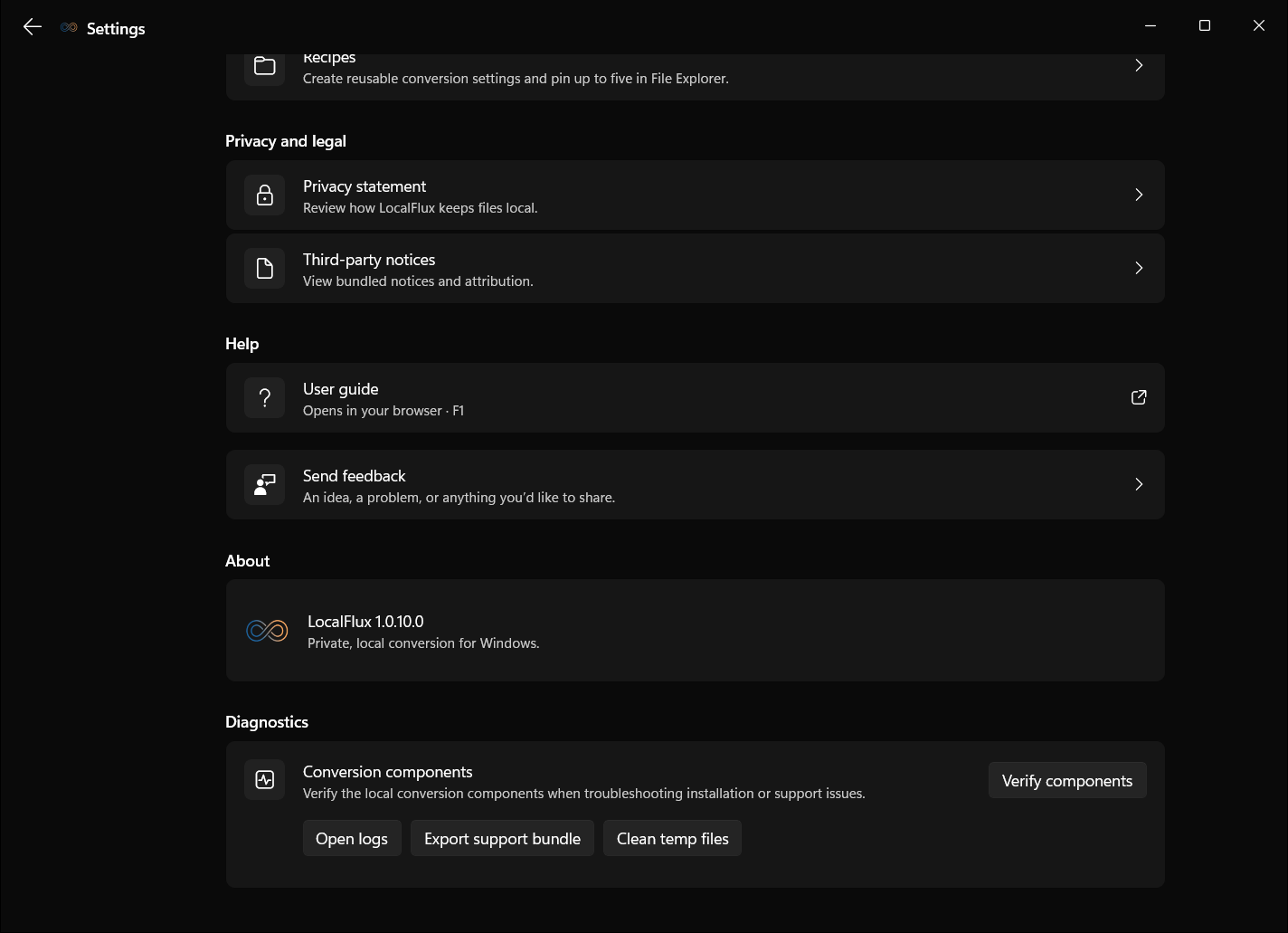
“No account” does not imply “no telemetry.” “No telemetry” does not imply “no local logs.” Local diagnostics can be useful and privacy-preserving when the user controls whether to share them, but the storage location and cleanup behavior should be documented.
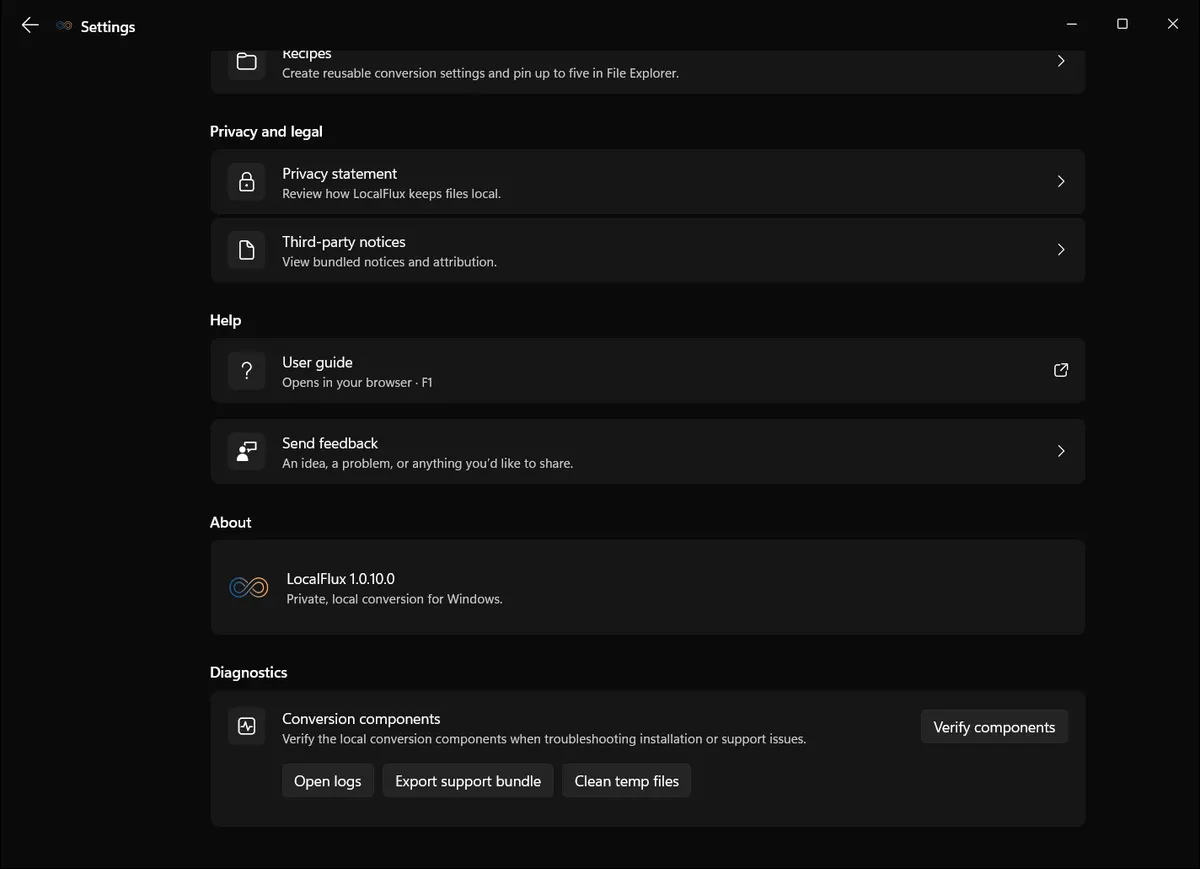
Interface screenshots were refreshed in October 2026 using a build reconstructed from the documented LocalFlux 1.0.10.0 release source. Historical measurements and downloads below retain their original test scope. Capture records: 1
Evidence checked on 13 October 2026: the public Trust Center identifies build 1.0.7.0. Earlier editorial tests used a retained 1.0.8.0 x64 package. The refreshed screenshots use new synthetic fixtures and a build reconstructed from the documented 1.0.10.0 x64 release source; their records are linked beside the illustrations. These functional observations are not Store certification, release authorization, clean-VM or ARM64 evidence, or a network test. Recheck the current Store listing and evidence before making a purchasing decision.
Review what the application stores locally and what, if anything, it transmits. The screenshot contains only synthetic editorial data and neutral paths.
Evidence to request: product settings, privacy documentation, network or telemetry architecture, log locations, and deletion instructions.
4. Confirm exact supported routes
“Converts hundreds of formats” is less useful than an explicit source-to-output matrix. Format names alone can conceal important boundaries:
- a container may hold streams encoded with unsupported codecs;
- a spreadsheet conversion may affect formulas, dates, or leading zeros;
- a document-to-PDF route may alter fonts or layout;
- an animated image may require frame and timing preservation;
- encrypted or signed files may need rejection rather than rewriting; and
- some files may be accepted only for extraction or compression, not arbitrary conversion.
Choose representative routes from the organization’s actual work. Do not let a successful PNG-to-JPG test stand in for document, audio, or video behavior.
Evidence to request: a current route matrix, important limitations, versioned test fixtures, and destination-app review guidance.
5. Verify original preservation and output naming
The safest default for a transformation utility is to leave the selected source in place and create a separate output. Confirm this behavior under normal and conflicting-name conditions.
Test what happens when the expected output already exists. A collision-safe application should not silently overwrite the source or an earlier result. It should choose a new name, require a deliberate decision, or fail clearly.
Separate output files reduce accidental overwrite risk. They are not a backup. The organization still needs independent protection for irreplaceable sources.
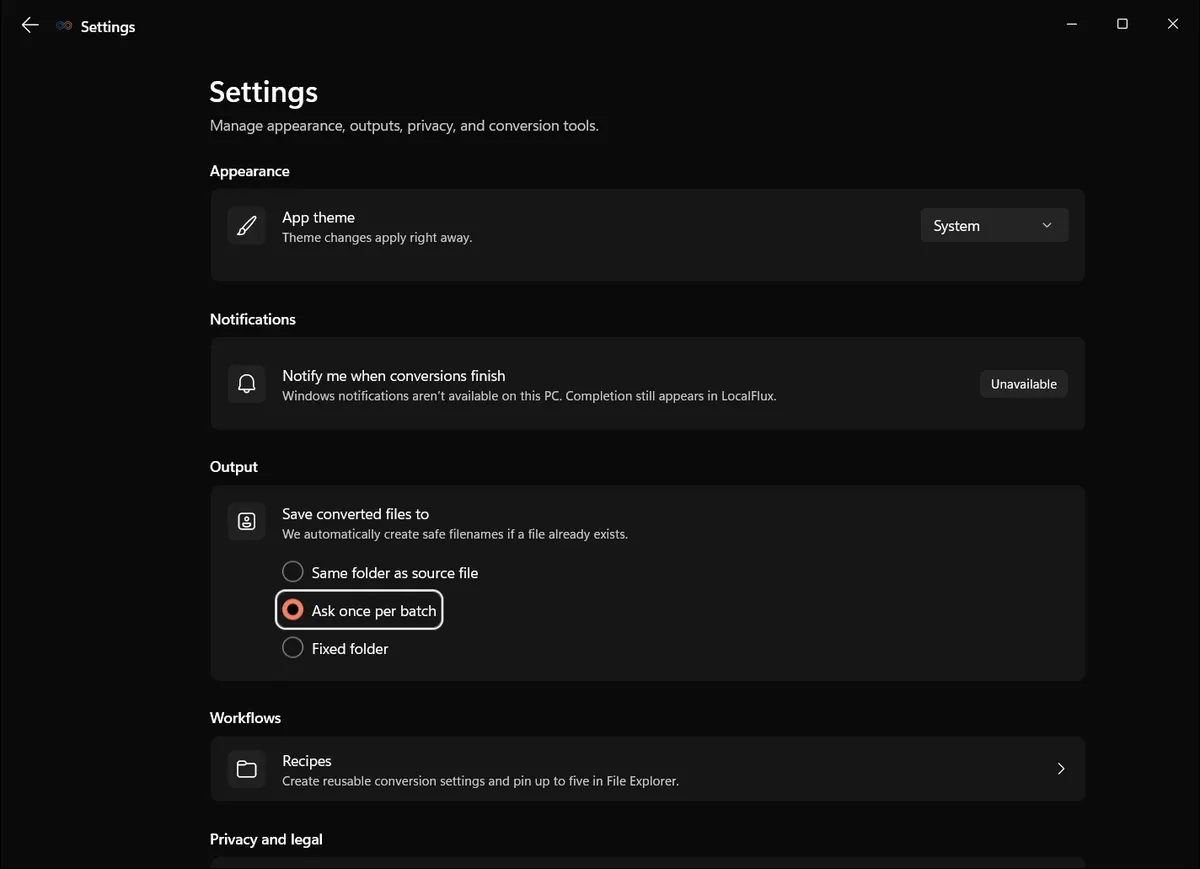
The reviewer should test same-folder, fixed-folder, and ask-every-time behavior that the product actually exposes.
Evidence to request: naming rules, destination settings, collision behavior, and before-and-after source hashes.
6. Test failure behavior, not only successful output
Conversion failures are normal. Files can be damaged, encrypted, signed, malformed, mislabeled, encoded with unsupported codecs, or outside the declared route.
Ask what the product does when it cannot produce a trustworthy result:
- Does it create a partial output?
- Does it leave temporary files behind?
- Is the source untouched?
- Is the error specific enough to guide the user?
- Can diagnostics be reviewed without automatically transmitting the source?
- Does a batch continue safely when one row fails?
A polished success screen tells you little about these boundaries. Include at least one invalid or unsupported fixture in the pilot.
Evidence to request: failure messages, absence of unintended outputs, temporary-file behavior, and local diagnostic records.
7. Inspect bundled components and notices
Desktop converters often rely on established media and document engines. That can provide broad, well-understood functionality, but it also creates a maintenance responsibility.
Identify each packaged component, its role, version, licensing notices, and update path. Ask how the vendor responds to relevant upstream security fixes. The presence of a respected component is neither a vulnerability by itself nor a substitute for product-level review.
LocalFlux documents ImageMagick for supported images, FFmpeg for supported audio and video work, LibreOffice for supported documents, and qpdf for supported PDF compression. The application includes third-party notices. The exposed LocalFlux Formats directory remains the product boundary; the underlying engines can support more operations than the interface promises.
Evidence to request: third-party notices, component inventory, current versions, and the product update mechanism.
Assign an owner to review relevant upstream advisories, identify the installed component versions and obtain updates through the approved channel. A bundled engine still needs maintenance. Record when a change requires a repeat of the pilot rather than treating an old test as permanent approval.
8. Verify package identity, publisher, and update channel
Record the installed package identity, version, architecture, publisher, and distribution source. For Store-packaged software, distinguish Store certification and signing from an independent security audit. They are not equivalent.
Microsoft documents its Store policies and Windows application distribution options. Use those sources to understand the platform path, then evaluate the specific vendor and package.
Confirm how updates are delivered and whether the organization can test material changes before broader use. Record the version in every pilot so conclusions do not float free of the build that produced them.
Evidence to request: package identity, publisher, signature status, version, architectures, update documentation, and vulnerability contact.
9. Check permissions and application capabilities
Review the capabilities declared by the package and compare them with the product’s stated job. Microsoft provides documentation for Windows application capability declarations.
A capability declaration is not proof that every possible access occurred. It is one input to the review. Combine it with runtime observation, code or architecture documentation where available, and representative tests.
Pay particular attention to broad file access, network access, removable storage, user libraries, microphone, camera, location, background execution, and child processes. The expected set depends on the application design.
Evidence to request: manifest capabilities and an explanation of why each is needed.
Microsoft notes that full-trust desktop apps can access the network without an internetClient declaration. Absence of that declaration is not isolation. Microsoft capability documentation
10. Review local storage, temporary files, and cleanup
Conversion can create working files, caches, previews, logs, outputs, and abandoned candidates. Determine:
- where each category is stored;
- whether filenames reveal client or project information;
- what remains after success, failure, cancellation, reset, and uninstall;
- which items the user can remove; and
- whether organization retention or secure-disposal requirements must be handled elsewhere.
Do not describe local storage as automatically private. Other users, administrators, malware, backup agents, indexing services, or physical access may still reach data according to Windows and organizational controls.
Evidence to request: storage locations, cleanup controls, and failure/cancellation tests.
11. Define output acceptance checks
Conversion completion is not acceptance. Establish checks by file family:
| File family | Minimum review |
|---|---|
| Images | Dimensions, orientation, transparency, animation, visible quality, and metadata policy |
| Audio | Duration, beginning/middle/end playback, channels, sample rate, and expected content |
| Video | Duration, playback, audio, sync, rotation, dimensions, frame rate, and visible quality |
| Documents | Page/slide/sheet count, fonts, layout, links, notes, tables, charts, formulas, dates, and hidden content |
Review the file in the destination application when possible. Keep the source until the output has passed the required check and retention period.
Evidence to request: documented verification steps and representative expected/observed results.
12. Evaluate the commercial and management model
An application can pass its local-processing test and still be a poor organizational fit. Ask about:
- commercial-use rights;
- per-user or per-device entitlement;
- multi-seat acquisition;
- invoices and tax documentation;
- license reassignment;
- managed deployment;
- silent installation and updates;
- centralized configuration;
- support channels and response commitments; and
- end-of-life and data-export behavior.
Do not infer enterprise readiness from a Microsoft Store listing. Microsoft’s current Intune Store-app documentation says paid Store apps are not supported in that Store-app flow. A vendor may offer another licensing or deployment method, but it must be verified for the exact product.
LocalFlux currently presents a self-serve Store trial and one-time purchase. It does not publicly document volume licensing, centralized administration, enforced organization presets, RBAC, SSO, administrator reporting, a DPA, or an enterprise SLA. That makes it a more credible fit for individual professionals and small self-managed teams than for a centrally controlled enterprise fleet today.
A compact evaluation scorecard
| Area | Pass condition | Evidence |
|---|---|---|
| Processing boundary | Source/output path is explicit and reproducible | Data-flow documentation plus synthetic test |
| Network boundary | Conversion works under the declared offline condition | Process-attributed observation and version record |
| Privacy | Account, telemetry, diagnostics, and local storage are documented | Privacy/trust pages and settings |
| Route scope | Required source-to-output routes are explicit | Route matrix and representative fixtures |
| Source safety | Sources remain unchanged; collisions are safe | Hashes and conflicting-name test |
| Failure safety | Unsupported or invalid input fails clearly | Boundary fixture and output-folder review |
| Supply chain | Components, publisher, and updates are known | Notices, package identity, update channel |
| Output quality | Destination-specific checks pass | Expected/observed table |
| Business fit | Purchasing, deployment, support, and control match the organization | Commercial and IT review |
Use Pass, Conditional, Fail, or Not applicable. Do not force every small utility into the same questionnaire used for a critical cloud platform. Do not waive a relevant requirement because the utility is inexpensive.
Add Not tested as a separate status when evidence could not be collected. It prevents an unavailable control, expired test window, or inconclusive observation from being silently converted into a pass. Assign an owner and due date to every not-tested item that affects approval, and decide whether the missing evidence blocks use or merely limits the permitted scope.
Worked example: what LocalFlux can and cannot establish
The public LocalFlux Trust Center states that supported jobs process selected source and output files on the Windows device, without a Fuzzysense conversion server. It separates Store and browser traffic from the processing path, documents no required LocalFlux account or normal-use analytics, identifies local diagnostics, lists bundled engines, explains separate output naming, and provides an offline test.
The retained 1.0.8.0 x64 editorial package was tested with synthetic DOCX, PNG, and WAV inputs. It produced PDF, JPG, and MP3 outputs, the recorded sources remained unchanged, and a repeated PNG route created a distinct collision-safe filename. These observations support those fixtures and that build only.
The editorial workstation did not provide administrator rights for the planned temporary process-specific firewall rule. Windows denied creation of the rule, no rule was left behind, and the offline criterion was therefore recorded as Not tested. That limitation matters: successful local output creation is not, by itself, proof that the process could not make an outbound connection. An organization that needs independent network evidence should repeat the route with an approved control or trusted endpoint telemetry.
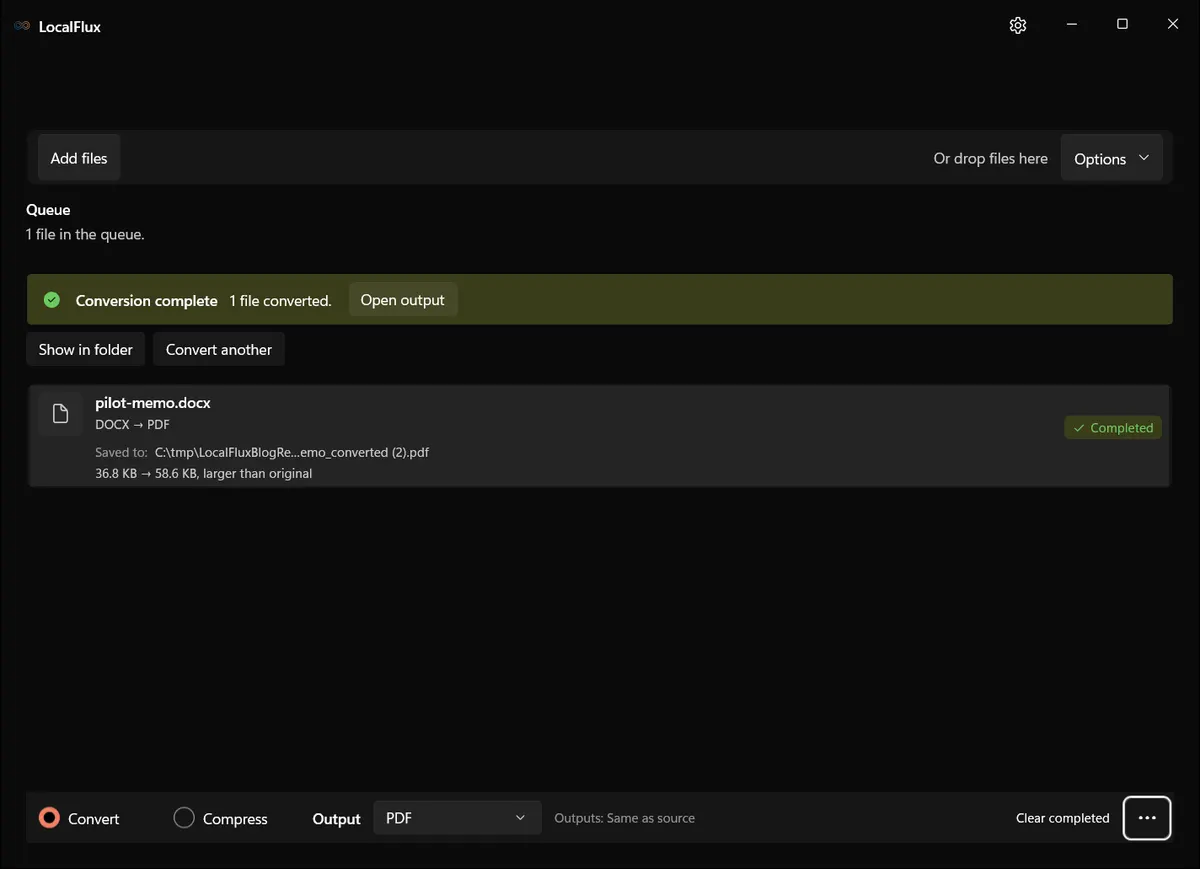
The new 13 October DOCX test repeated the conversion after restarting the app. The first PDF retained its SHA-256; the second used a (2) suffix. The screenshot shows the second result, while the linked capture record accounts for both files.
A separate output reduces accidental overwrite risk. It does not provide backup, retention enforcement, or centralized auditing.
The evidence does not establish regulatory compliance, malware absence, secure deletion, perfect fidelity, unattended automation, network-share processing, centralized policy, or enterprise deployment. Those conclusions require different product capabilities and organizational evidence.
Turn the checklist into a controlled pilot
Finish the paper review before introducing real work files. Then run a small pilot with synthetic fixtures that represent the required formats and important failures.
Record the package identity, environment, source and output hashes, exact routes, network condition, collision behavior, and destination-app review. Decide which file classifications are permitted, who may use the tool, and what requires escalation.
Review LocalFlux’s processing boundary, confirm the supported routes, and evaluate the Microsoft Store trial with non-sensitive sample data before making an organizational decision.