
How to Pilot a Local File Converter Before Approving It for Work
On this page
- Define the decision before testing
- Review the paper trail first
- Build synthetic fixtures that reveal mistakes
- Use a four-folder workspace
- Establish a baseline
- Run one route at a time
- Test offline behavior carefully
- Local processing, offline conversion and an air gap are different
- Test collisions and repeatability
- Include controlled failures
- Inspect settings, diagnostics, and cleanup
- Score the pilot against explicit criteria
- Write a decision memo people can use
- Define retest triggers
- A pilot is a boundary, not a badge
A product page can tell you what a file converter claims to do. A short, controlled pilot tells you what it actually does on your Windows machines, with your supported formats and your operating rules.
That difference matters. File conversion sits between an input that may contain business information and a new output that someone will trust, share, archive, or import into another system. A converter can be easy to use and still be a poor operational fit. It may place outputs somewhere unexpected, overwrite names, handle errors badly, depend on a network connection, or support only a narrower set of routes than users assume.
The goal of a pilot is not to prove that software is perfectly secure. A small IT team cannot reproduce a vendor security assessment in an afternoon. The goal is to reduce uncertainty enough to make a bounded decision: approve the utility for named use cases, approve it with restrictions, continue evaluation, or decline it.
This guide shows how to run that pilot with synthetic files, repeatable observations, and an evidence packet another reviewer can understand.
Define the decision before testing
Start with a one-paragraph decision statement. For example:
Determine whether the named Windows package can be approved for three routine, non-regulated conversion routes on managed workstations: DOCX to PDF, PNG to JPG, and WAV to MP3. The pilot will not authorize confidential data, automated batch workflows, server deployment, or formats outside the tested list.
That statement prevents a common failure: the test expands as people discover features, then a successful demonstration is treated as blanket approval.
Record five boundaries before opening the app:
- Who is involved? Name the operator, technical reviewer, business owner, and decision owner.
- Which package is under review? Record the product name, package source, version, architecture, hash, publisher, and signing result.
- Which routes are in scope? Write source and destination formats as pairs, not broad categories such as “documents.”
- Which data classification is allowed? Use synthetic or public data during the pilot. Approval for sensitive data is a separate decision.
- What would make the pilot fail? Define unacceptable network behavior, unexplained output placement, destructive source handling, unstable results, or missing operational documentation.
Keep exclusions visible. If the product has no documented enterprise deployment path, command-line interface, central administration, audit export, or support commitment, do not imply that the pilot evaluated those capabilities.
Review the paper trail first
Before executing an unfamiliar converter, collect the material available without running it. This is the least expensive point to stop.
For a Microsoft Store or MSIX-distributed Windows app, capture the listing URL or package origin, stated publisher, privacy policy, support route, version, system requirements, supported formats, and pricing or licensing terms. Inspect the package signature and declared capabilities where your tooling permits. Microsoft documents the Store certification process and MSIX signing model; a valid signature helps establish package identity and integrity, but it does not mean Microsoft has performed a bespoke security audit of the product.
Ask the vendor or product team to distinguish claims from evidence. “Local processing” should be connected to a described architecture or reproducible observation. “No upload required” should identify whether any update, licensing, crash-reporting, or optional diagnostic traffic remains. “Works offline” should specify which conversion routes were tested and whether initial installation or dependency acquisition still requires connectivity.
Evidence checked on 13 October 2026: the public Trust Center identifies build 1.0.7.0. Earlier editorial tests used a retained 1.0.8.0 x64 package. The refreshed screenshots use new synthetic fixtures and a build reconstructed from the documented 1.0.10.0 x64 release source; their records are linked beside the illustrations. These functional observations are not Store certification, release authorization, clean-VM or ARM64 evidence, or a network test. Recheck the current Store listing and evidence before making a purchasing decision.
Build synthetic fixtures that reveal mistakes
Do not begin with a real customer document. Create small, rights-cleared fixtures that are easy to recognize and deliberately contain features that expose conversion problems.
For a document route, include a title, a short paragraph, a numbered list, a simple table, a page break, and a footer. Put the words “SYNTHETIC PILOT FILE” on every page. For an image route, use colored shapes, a gradient, small text, transparency where relevant, and known pixel dimensions. For audio, generate a short tone or spoken phrase with a known duration and sample rate.
Give every source a stable name, such as:
pilot-memo.docxpilot-grid.pngpilot-tone.wav
Hash the inputs before testing. SHA-256 does not tell you whether a document is safe, but it lets a second reviewer confirm that they used the same bytes. Store fixture-generation notes or source assets so the test can be repeated later.
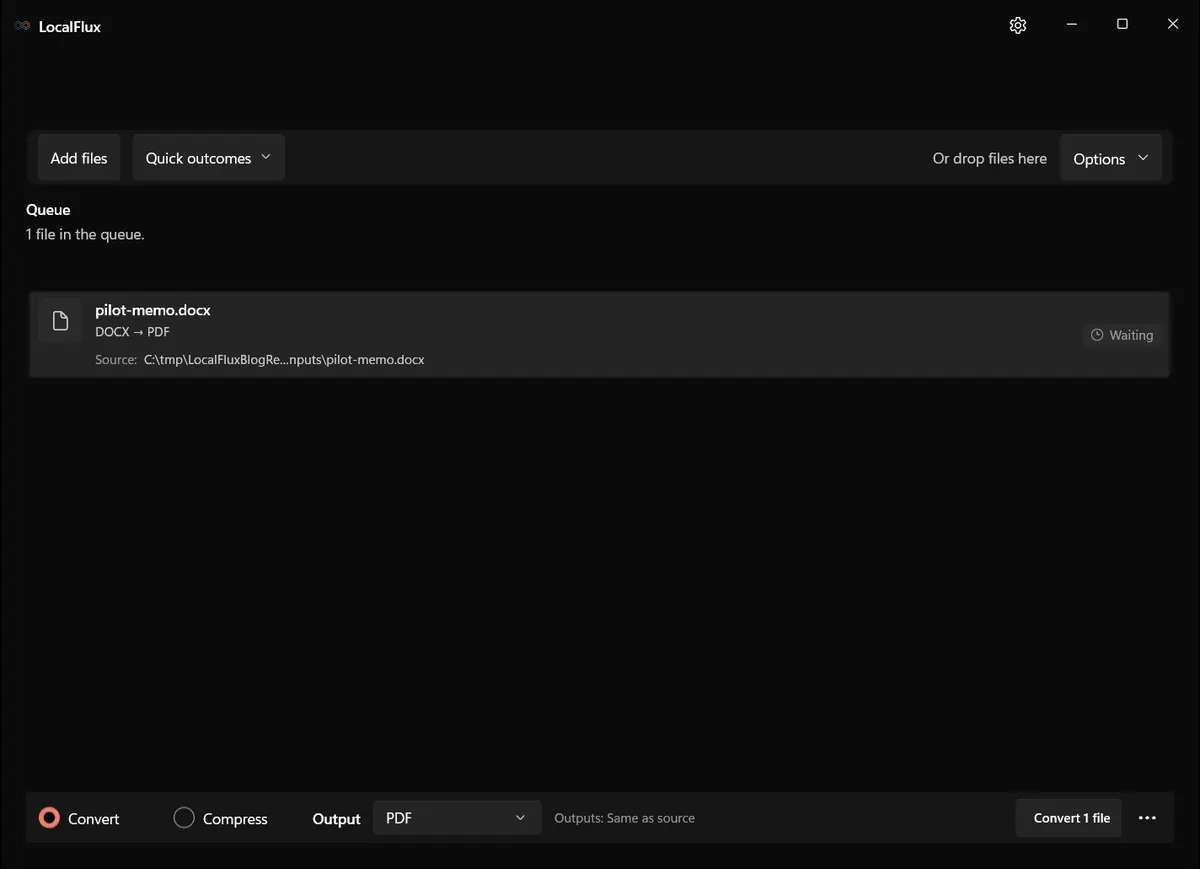
Interface screenshots were refreshed in October 2026 using a build reconstructed from the documented LocalFlux 1.0.10.0 release source. Historical measurements and downloads below retain their original test scope. Capture records: 1 · 2
A recognizable synthetic fixture makes screenshots safe to share and output defects easier to spot.
Use a four-folder workspace
Create a neutral pilot root with four folders:
01-Incomingcontains immutable copies of the fixtures.02-Workingcontains the copies supplied to the converter.03-Reviewreceives outputs awaiting verification.04-Deliverycontains only outputs that passed review.
This layout separates originals from generated files and makes cleanup predictable. It also gives the operator a simple rule: never deliver directly from the converter’s output folder.
Record the workstation edition, Windows build, architecture, account type, and app version. Note whether the machine is a normal managed workstation, an isolated test machine, or a clean virtual machine. Do not call an ordinary local-host test a clean-VM test.
Pause sync clients for the pilot workspace if policy permits, or choose a folder that is not synchronized. A local-processing claim describes the converter’s behavior, not every other program on the workstation. OneDrive, backup software, endpoint agents, preview handlers, or indexing services may still interact with files.
Establish a baseline
Before the first conversion, capture a baseline:
- hashes and sizes of the input fixtures;
- contents of all four folders;
- app version and package identity;
- relevant app settings, especially output location and diagnostics;
- whether the workstation is online;
- processes and network-observation method used during the test.
Avoid claiming that a quiet network graph proves there was no network activity. A short observation may miss brief traffic, and process-level attribution can be difficult. State the exact method, duration, route, and result. For higher-risk approval, use endpoint telemetry or network controls that your security team already trusts.
Run one route at a time
For each format pair, use the same sequence.
1. Copy the fixture into Working
Keep the baseline source in 01-Incoming. Copy it to 02-Working, calculate the working-copy hash, and confirm that it matches.
2. Select an explicit destination
If the converter supports a destination setting, direct output to 03-Review. If it uses a fixed convention, document the exact location. An operator should never need to search Downloads, Desktop, or the source tree to find the result.
3. Convert and record the result
Record start and end time, source name, selected route, application status, output name, output path, file size, and output hash. Note warnings even if a usable file was produced.
4. Confirm that the source did not change
Recalculate the working source hash and compare it with the baseline. Also verify that the original in 01-Incoming remains untouched.
5. Inspect the output independently
Open the result in the normal destination application, not only inside the converter. Check content, pagination, fonts, dimensions, duration, metadata, and usability as appropriate. A “completed” status means the converter finished; it does not mean the business output is correct.
In our local editorial reproduction, the synthetic DOCX, PNG, and WAV fixtures completed through the selected LocalFlux routes. Those observations cover only the named files, package, machine, and settings recorded with this article. They should not be generalized to every document, codec, or Windows environment.
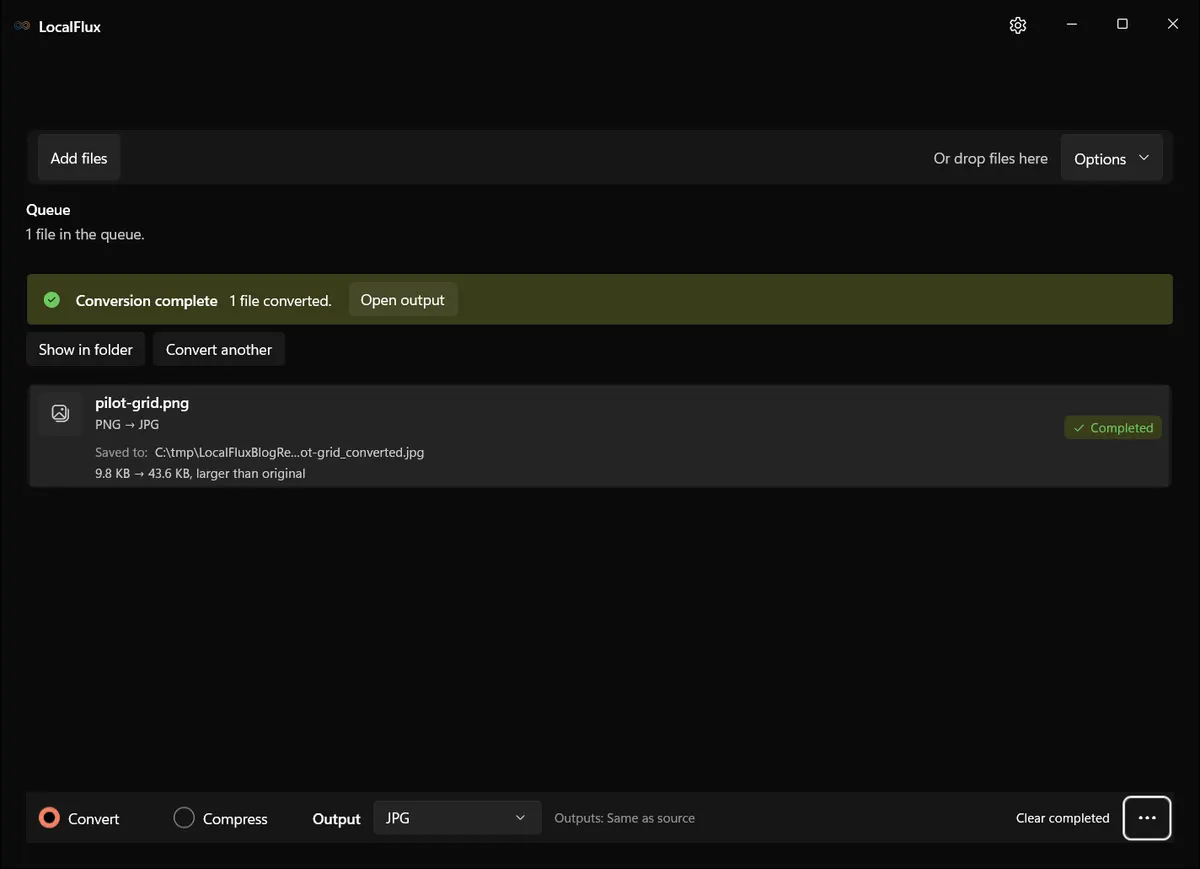
In the new 13 October 2026 test, the 800 × 600 PNG converted to JPG, but its translucent edge became opaque underlying colors rather than the expected white-background composite. Completion did not mean appearance was preserved. Check the required background before accepting the result.
Record the route and environment alongside the screenshot. The image establishes the visible route result; it does not establish network behavior.
Test offline behavior carefully
If offline operation matters, make it a separate test case. First complete an online baseline, then repeat the same fixture and settings under a controlled offline condition approved by IT. Do not disable protective controls or improvise firewall changes on a production workstation.
The result should be phrased narrowly: “PNG to JPG completed on the named machine while the test condition prevented the LocalFlux process from making outbound connections,” or “the route failed because a dependency was unavailable.” Record how the condition was created and restored. If the condition cannot be established, record Not tested rather than inferring an answer from successful output.
A process list or Resource Monitor view can support the timeline, but it is not a substitute for trusted telemetry. It also may expose usernames, hostnames, IP addresses, or unrelated processes, so redact or exclude sensitive material before putting screenshots into an approval packet.
In this editorial reproduction, Windows denied creation of the planned temporary process-specific firewall rule because the session did not have the required administrator rights. No rule was created, and we did not substitute a Resource Monitor screenshot or a quiet graph for the missing control. The offline criterion in the evidence packet is therefore Not tested. The successful DOCX, PNG, and WAV routes remain useful functional observations, but they do not close the network question.
Local processing, offline conversion and an air gap are different
An offline conversion test after installation does not establish that a never-connected machine can acquire, install, license or update the app. An air gap requires actual separation and controlled transfers. Before approving an isolated workflow, verify the exact installer, dependencies, entitlement, first launch, representative routes and update-transfer procedure on that machine. Keep support submissions and browser links outside the isolated workflow. This editorial update adds no new runtime evidence: existing untested criteria remain untested. Review the security context when deciding the pilot’s scope.
Test collisions and repeatability
Run the same conversion twice without removing the first result. An acceptable product should behave predictably: ask before replacement, create a non-destructive unique name, or follow another documented rule. Silent overwrite is a serious operational risk when outputs may already have been reviewed.
Then repeat the route after restarting the application. Compare output size and hash. Different hashes are not automatically a failure. Some formats contain timestamps or nondeterministic metadata, but the difference should be explainable, and visible content should remain stable.
Test names with spaces, a modestly long filename, and non-ASCII characters if those are part of your real workflow. Do not turn a small pilot into an exhaustive fuzzing project; choose cases that represent how your team names files.
Include controlled failures
A useful pilot includes at least three failure cases:
- an unsupported source format;
- a deliberately truncated or invalid synthetic file;
- a dedicated test destination whose permissions deny writing for the test account; verify the denial with that account before testing the converter.
Observe whether the application explains the problem, leaves the source intact, avoids presenting a partial output as successful, and lets the operator recover. Record temporary or partial files that remain. Never use malicious samples unless your security team has provided an isolated, authorized procedure.
Also test cancellation on a sufficiently large synthetic file if the app supports it. Confirm what happens to partially written output and whether a later retry succeeds.
Inspect settings, diagnostics, and cleanup
Review every setting related to output location, history, recent files, diagnostics, crash reporting, and automatic updates. Distinguish between controls visible to the user and behavior you merely inferred.
After closing the app, inspect the pilot workspace and the app’s documented data locations. Note whether recent-file entries, logs, thumbnails, or temporary artifacts remain. Do not promise secure deletion unless the product and your storage platform explicitly provide it. On modern SSDs and synchronized or backed-up systems, ordinary deletion is not a reliable sanitization method.
Define cleanup as an operational outcome: remove test-only files according to policy, retain the evidence packet, restore any temporary test controls, and return the workstation to its initial state. If you installed a test package on a machine that did not previously contain it, uninstall that exact package after evidence capture.
Score the pilot against explicit criteria
Use a pass, conditional pass, fail, or not-tested result for each criterion.
| Area | Example pass criterion | Evidence |
|---|---|---|
| Package identity | Expected version, publisher, architecture, signature, and hash recorded | Package inspection record |
| Source handling | Source hashes unchanged after all routes | Before/after hash table |
| Output location | Every output appears in the selected Review folder | Folder listing and screenshot |
| Route quality | Named fixtures open and meet route-specific checks | Reviewer notes |
| Collision behavior | Existing output is not silently destroyed | Repeat-run record |
| Failure behavior | Invalid input produces a clear failure and no misleading success | Failure log |
| Offline observation | Named routes meet the defined offline condition | Method and timestamped observation |
| Diagnostics | User-visible controls match the documented operating rule | Settings capture |
| Cleanup | Temporary controls restored and test package/files removed or retained by policy | Cleanup checklist |
| Business fit | Licensing, support, deployment, and ownership questions resolved | Procurement notes |
“Not tested” is a legitimate result. It is better than quietly turning an assumption into approval.
Write a decision memo people can use
End with a one-page decision memo. Include:
- package and version reviewed;
- approved conversion routes;
- permitted data classifications;
- permitted workstation types and user groups;
- required settings and output location;
- known limitations and untested areas;
- support and escalation owner;
- review date and retest triggers;
- final decision owner and status.
A bounded approval might say: “Approved for named, non-regulated office and marketing files on managed Windows 11 workstations, using the documented four-folder SOP. Not approved for confidential legal, health, payment, identity, or export-controlled data; unattended processing; or formats not listed in this memo.” Your classification language should match your own policy.
Do not assume that a Store listing provides enterprise deployment rights. Microsoft’s current Intune Store-app documentation says paid Microsoft Store apps are not supported in the current Store-app flow. Confirm licensing, acquisition, deployment, update control, and support before presenting the product as a team-wide solution.
Define retest triggers
Approval should have a shelf life. Retest when any of these changes:
- application version, package identity, publisher, or distribution channel;
- privacy policy, terms, pricing, or support arrangement;
- Windows version or workstation architecture;
- conversion engine or dependency bundle;
- diagnostics or network behavior;
- requested file formats or data classifications;
- an incident, material defect, or unexplained output difference.
For a routine desktop utility, a lightweight version-change review plus periodic full pilot may be enough. Higher-risk data or broader deployment justifies stronger testing and supplier review.
A pilot is a boundary, not a badge
The best pilot does not end with “the app works.” It ends with a decision that says where it works, for whom, with which files, under which controls, and what remains unknown.
Synthetic fixtures keep the evaluation safe. Hashes and screenshots make it repeatable. Failure and collision tests reveal operational surprises. A clear memo prevents a narrow result from becoming an unlimited claim.
That is enough to turn an informal utility test into evidence an IT generalist, operations lead, or procurement reviewer can challenge and, when the result supports it, approve with confidence.