
How to Convert Old XLS Files to XLSX Without Excel
On this page
An old .xls workbook may still contain useful budgets, inventory, research, or project history, yet current workflows increasingly expect .xlsx. You do not need Microsoft Excel just to create a modern copy. LocalFlux uses its bundled document runtime to write XLSX locally while leaving the original XLS file in place.
We tested two macro-free workbooks with LocalFlux 1.0.8.0 x64: a minimal two-cell legacy workbook and a small CSV-derived inventory fixture. Both produced structurally valid XLSX packages. Their file sizes stayed close to the sources, which is a reminder that modernization is about compatibility and structure, not guaranteed compression.
Try a small copy of your own workbook before migrating an archive. Record one formula and its expected result, a date, a text identifier with leading zeros, and the sheet names. After conversion, compare the formula text and displayed values before saving or recalculating in the destination app. Stop if macros are required: XLSX is not their preservation format. These checks were not performed by the zero-formula fixtures below.
What XLS and XLSX actually mean
XLS is the binary workbook format associated with Excel 97 through Excel 2003. It can represent numbers, text, formulas, formatting, charts, images, names, external connections, and macro content. XLSX is an Office Open XML package: a ZIP container whose workbook, worksheets, styles, relationships, and other parts are represented mainly in XML.
That change is more than a suffix. A converter must parse the binary workbook and write a new package. It must also decide what to do with features that do not have a safe macro-free XLSX representation. Microsoft explicitly distinguishes XLSX from XLSM: XLSX cannot store VBA code or Excel 4.0 macro sheets.
Therefore, inspect an unknown XLS for macros, external links, embedded objects, hidden sheets, names, and formulas before treating XLSX as a replacement. The safest goal is a new editable access copy, followed by validation, while the XLS remains available.
When this conversion makes sense
Convert when the destination genuinely requires XLSX, not simply because the extension looks newer. A compatibility copy is useful when it solves a concrete editing, sharing, or document-exchange problem.
Good reasons include:
- opening a simple old workbook in current spreadsheet software
- modernizing macro-free archives one verified copy at a time
- sharing an editable workbook with recipients who expect XLSX
- converting locally without installing or automating Microsoft Excel
Pause or choose another workflow when you are:
- discarding an XLS that may contain macros
- assuming cached formula results prove formulas survived
- bulk migration before checking representative complex workbooks
- claiming identical layout or feature fidelity without inspection
If macros, external connections, ActiveX controls, or embedded objects matter, stop and inventory them first. XLSX is macro-free. Choose a macro-capable preservation path or retain the XLS as the authoritative copy.
The short workflow
- Copy the source files into a working folder and keep an untouched backup.
- Open LocalFlux and stay on Convert.
- Add the XLS file or files.
- Confirm each queue card shows the intended route to XLSX.
- Select XLSX explicitly if another output is shown by default.
- Start the queue and wait for the completed status.
- Verify the new files before moving, sharing, or deleting anything.
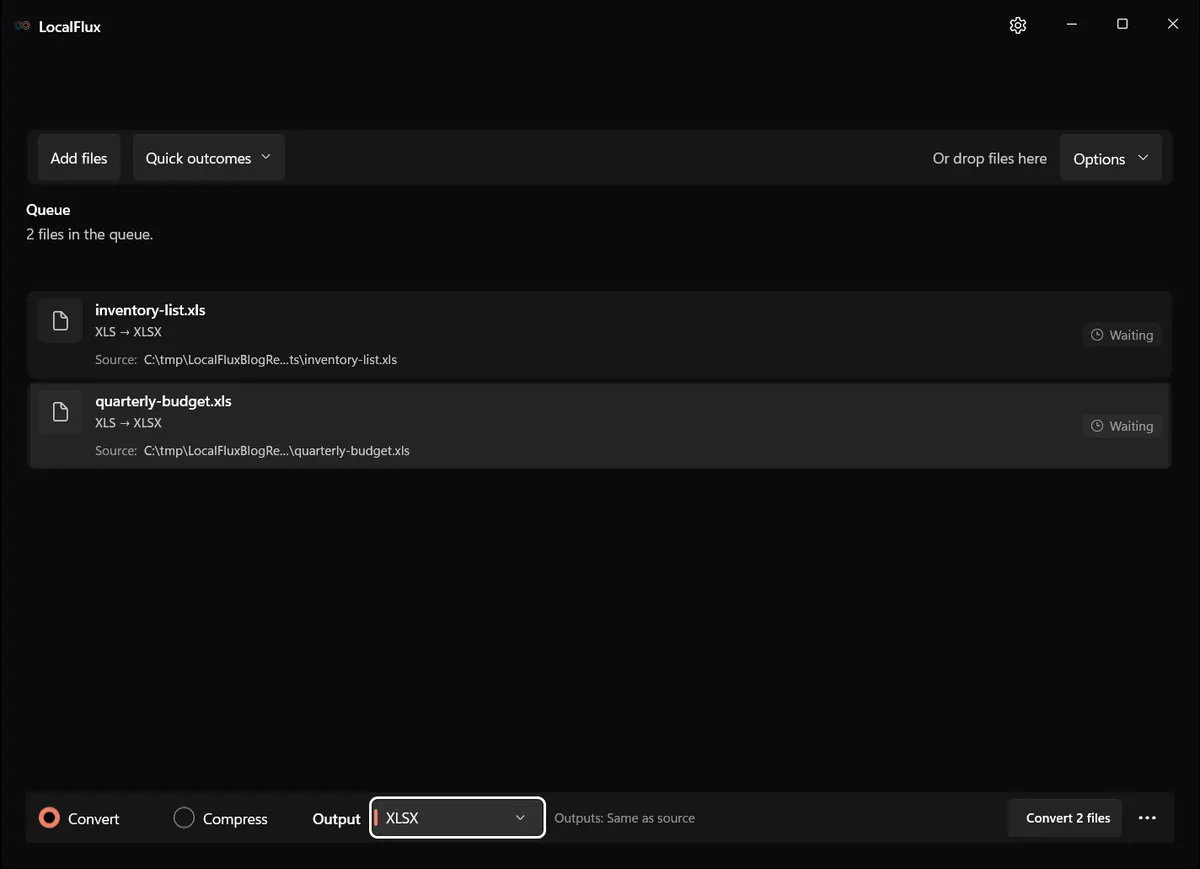
Interface screenshots were refreshed in October 2026 using a build reconstructed from the documented LocalFlux 1.0.10.0 release source. Historical measurements and downloads below retain their original test scope. Capture records: 1
Rechecked on 13 October 2026: all twenty XLSX outputs from the reconstructed 1.0.10.0 runs preserve the populated cells and sheet names of these two fixtures. Despite its filename, quarterly-budget.xls contains only two text cells on Summary; inventory-list.xls has twelve populated cells on primary, including three numbers. Neither XLS input contains a formula. This is a basic cell-transfer check, not evidence of formula recalculation, chart fidelity or complex-workbook compatibility. Cell checks
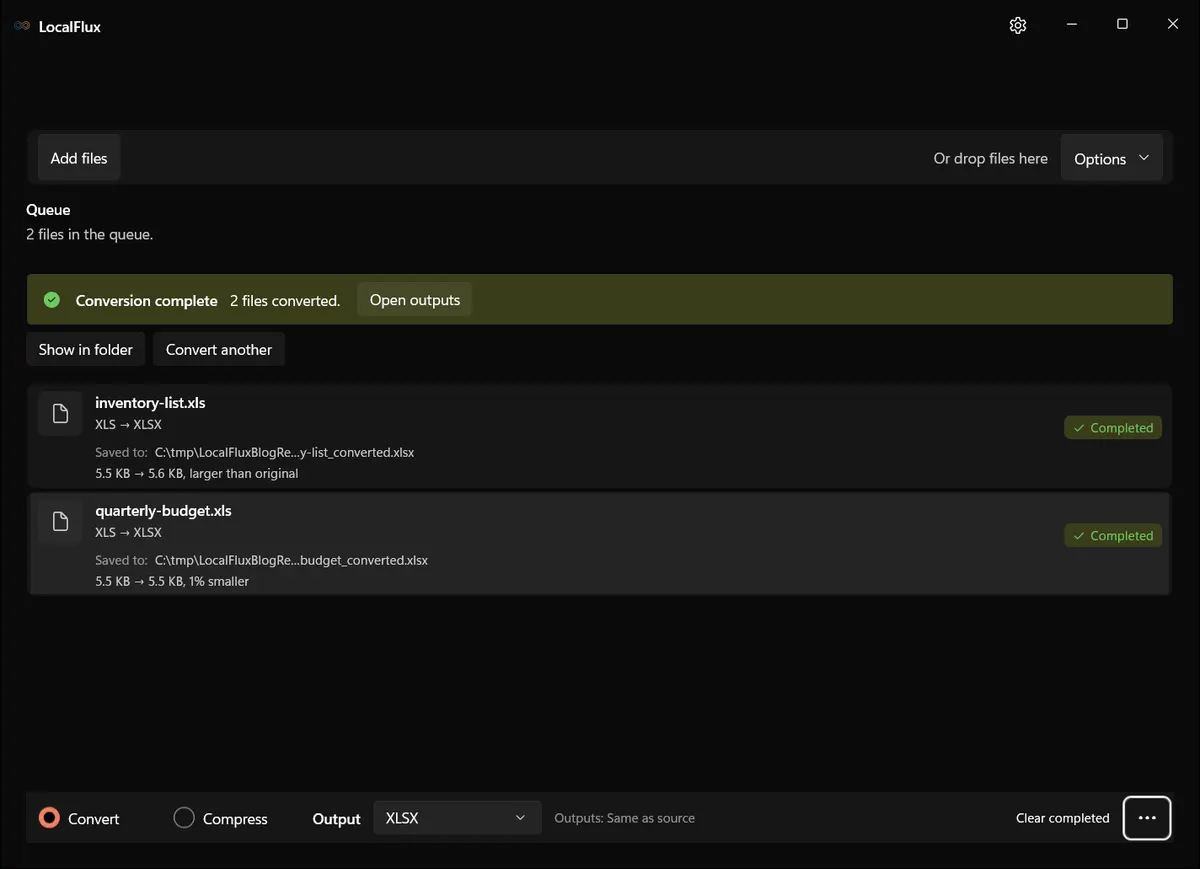
What happened in our LocalFlux 1.0.8.0 test
| Fixture | Input | Output | Observed result |
|---|---|---|---|
quarterly-budget.xls | 5,632 bytes | 5,603 bytes | Valid XLSX package; about 1% smaller |
inventory-list.xls | 5,632 bytes | 5,727 bytes | Valid XLSX package; about 2% larger |
Both outputs contained the expected Open XML workbook and worksheet parts and could be parsed as ZIP-based XLSX packages. These minimalist fixtures do not contain macros, charts, comments, external links, or hidden sheets, so the result cannot establish preservation of those features.
The source SHA-256 hashes were unchanged after conversion. See the published test record and SHA-256 media manifest below for the exact files and tested package.
How to verify the converted file
- Compare visible values and separately inspect formulas, not only cached results.
- Check dates, leading-zero identifiers, decimal precision, and number formats.
- Confirm sheet names, sheet order, hidden state, merged cells, widths, and row heights.
- Inventory names, charts, images, comments, links, and macros.
- Open the XLSX in the actual destination spreadsheet application before migration.
Quality, compatibility, and file size
Spreadsheet fidelity has both structural and visual dimensions. A workbook can open while formulas change, date serials render differently, columns reflow, or a chart disappears. Compare a calculated-value report and a rendered view. Recalculate in the destination only after keeping a copy of the first converted output, because recalculation can mask what the converter originally wrote.
Byte count remains useful as a diagnostic. An implausibly tiny result can signal missing cells, sheets or objects, and an unexpectedly large result can reveal a different encoding strategy. But a plausible size is never proof of fidelity. Use it alongside format-aware checks.
Compatibility is also destination-specific. “It opens on this PC” does not prove that a web portal, records system or colleague’s spreadsheet application will accept it. Test where the file will actually be used.
Troubleshooting
If XLSX is not the selected output, open the format list and choose it explicitly; PDF is a common default for old office documents. If the output opens with a repair warning, stop and keep the original. If dates shift, check locale and date-system settings. If identifiers lose leading zeros, compare number formats. If a macro-enabled workbook loses automation, that is expected for XLSX and should have been caught during the preflight inventory.
When a conversion fails, do not keep changing the source extension. Work from a copy, record the exact error, and determine whether the issue is corruption, protection, an unsupported workbook feature, a locked file, or insufficient disk space. Retry one file at a time before returning to a batch.
Privacy notes for local conversion
The screenshots and sample files in this package are privacy-safe editorial fixtures. They contain no accounts, notifications, personal filenames, customer data, or cloud URLs. The conversion occurred through the desktop app with bundled local runtimes.
Local processing reduces the need to send a file to an unknown converter website, but normal endpoint security still matters. Protect the Windows account, keep sensitive outputs in an appropriate folder, and remove temporary copies according to your retention policy. Do not publish screenshots made from real confidential documents simply because the conversion itself was local.
Frequently asked questions
Can I convert XLS to XLSX without Excel?
Yes. The tested LocalFlux workflow used its bundled LibreOffice runtime and did not launch or automate Microsoft Excel.
Will formulas still work?
They can, but verify formula text and results. Neither test workbook contains formulas, so these results do not validate formula conversion.
Does XLSX keep macros?
No. XLSX is macro-free; macro-bearing workbooks need a suitable format, such as XLSM, and separate validation.
Is XLSX always smaller?
No. One fixture became slightly smaller and one slightly larger.
Can I delete the XLS after conversion?
Not until the XLSX passes structural, visual, and destination-app checks. For important records, retain the original.
Publication evidence
Technical references
The format guidance above is checked against these independent specifications and platform references.
- ECMA-376 Office Open XML file formats, Ecma International