
How to Convert Opus to MP3 on Windows Offline
On this page
An .opus file is often an excellent delivery format for voice, calls, podcasts, or efficient music. The problem appears when an older editor, car stereo, presentation tool, or upload form accepts MP3 but not Opus. Renaming the extension cannot solve that mismatch: the audio must be decoded and encoded as MP3.
LocalFlux performs that job on the Windows PC. It creates a new MP3 copy, keeps the Opus source, and presents the work in a local queue. In our LocalFlux 1.0.8.0 x64 tests, both a one-second stereo fixture and a two-second mono fixture completed successfully. Their channel layouts and 48 kHz sample rate were retained, while durations differed from the source container timestamps by only 0.0065 seconds.
What Opus and MP3 actually mean
Opus is an IETF speech and audio codec designed to cover both low-bitrate speech and high-quality stereo audio. A typical .opus file is an Ogg container carrying an Opus stream. MP3 is MPEG Layer III audio, supported by an enormous range of older and current software and hardware.
The important point is that this is normally a lossy-to-lossy transcode. Opus has already discarded information according to its encoder settings. Encoding the decoded signal again as MP3 cannot restore that information, and it can introduce another generation of loss. Make the MP3 because a destination requires it, not because MP3 is inherently higher quality.
Ogg Opus uses pre-skip and end trimming to remove encoder padding from playback. The reported container duration can therefore differ from the decoded audio duration. Compare decoded sample counts and listen for clipping; a small timestamp difference alone does not establish missing sound.
When this conversion makes sense
Convert when the destination genuinely requires MP3, not simply because the extension looks newer. A compatibility copy is useful when it solves a concrete playback, editing, sharing, or document-exchange problem.
Good reasons include:
- an older player or device that accepts MP3 but not Opus
- a presentation, editor, or form with an MP3-only input rule
- a compatibility copy for a recipient who cannot install another codec
- a local batch where source audio should not be uploaded
Pause or choose another workflow when you are:
- archiving the only master copy
- repeatedly transcoding files that are already lossy
- claiming that a larger MP3 is higher quality
- using MP3 when the destination already supports Opus
Keep the Opus file as the master. Choose the MP3 as a compatibility derivative, and listen to speech consonants, music transients, and quiet passages before distributing it.
The short workflow
- Copy the source files into a working folder and keep an untouched backup.
- Open LocalFlux and stay on Convert.
- Add the Opus file or files.
- Confirm each queue card shows the intended route to MP3.
- Select MP3 explicitly if another output is shown by default.
- Start the queue and wait for the completed status.
- Verify the new files before moving, sharing, or deleting anything.
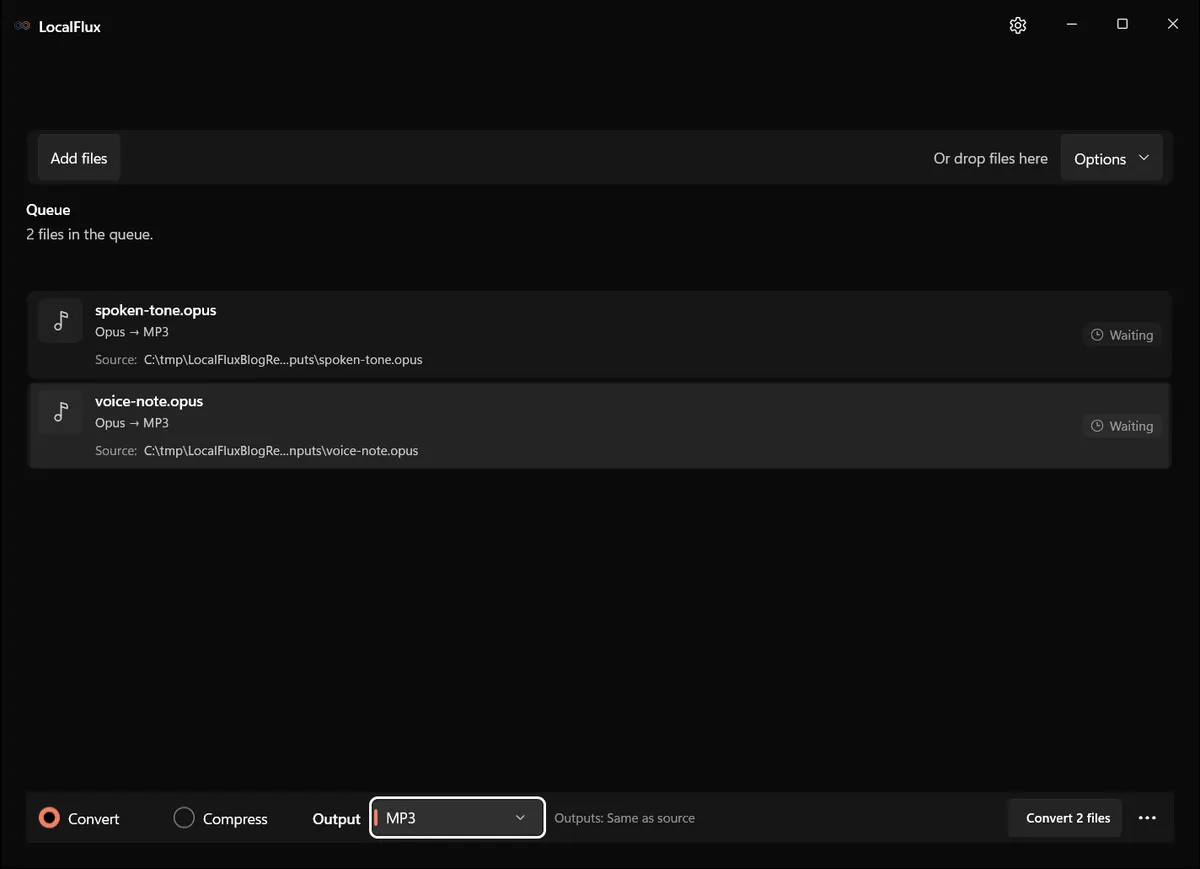
Interface screenshots were refreshed in October 2026 using a build reconstructed from the documented LocalFlux 1.0.10.0 release source. Historical measurements and downloads below retain their original test scope. Capture records: 1
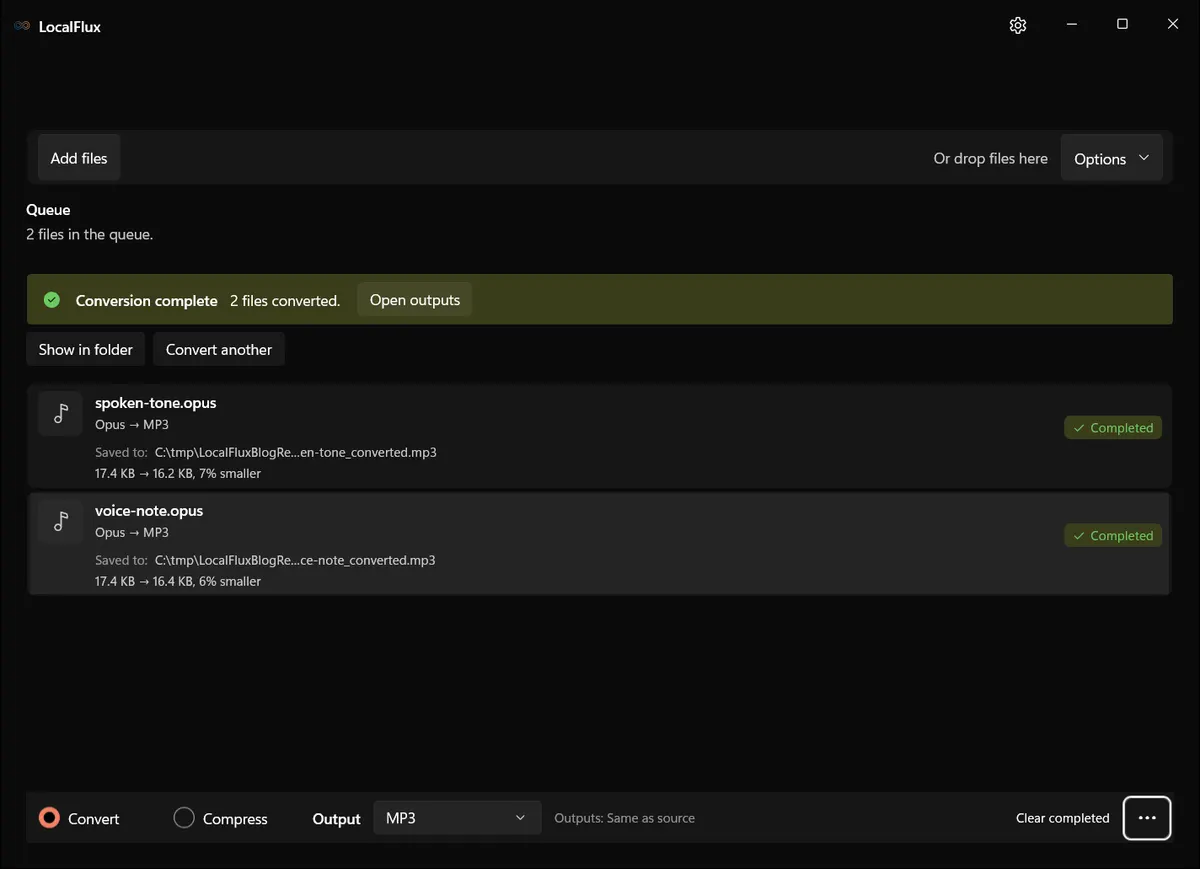
What happened in our LocalFlux 1.0.8.0 test
Rechecked on 13 October 2026: fully decoding the retained source/output pairs produced exactly 48,000 and 96,000 samples per channel at 48 kHz: 1 and 2 seconds respectively, with no decoded-duration reduction. The historical table reports container/probe durations. This structural check does not establish perceptual equivalence or gapless playback on every player.
| Fixture | Input | Output | Observed result |
|---|---|---|---|
voice-note.opus (stereo, 48 kHz) | 17,854 bytes | 16,749 bytes | MP3, stereo, 48 kHz; 1.0065 s to 1.0000 s |
spoken-tone.opus (mono, 48 kHz) | 17,858 bytes | 16,557 bytes | MP3, mono, 48 kHz; 2.0065 s to 2.0000 s |
Both outputs used the MP3 codec and retained the source channel count. The modest 6 to 7% size reduction is specific to these tiny synthetic fixtures; real recordings can be larger or smaller depending on duration, source bitrate, silence, and the MP3 encoder settings. The result is a transcode, not a lossless container swap.
The source SHA-256 hashes were unchanged after conversion. See the published test record and SHA-256 media manifest below for the exact files and tested package.
How to verify the converted file
- Play the beginning and end to catch clipped words or missing tails.
- Check that mono remains mono and stereo remains stereo when that distinction matters.
- Compare tags such as title, artist, album, and cover art if your workflow depends on them.
- Confirm the destination device actually accepts the produced MP3.
- Retain the Opus source hash until the compatibility copy is approved.
Quality, compatibility, and file size
Do not judge quality from extension or byte count. A smaller output may sound acceptable, and a larger one may still contain new encoding artifacts. For speech, listen to sibilants and breaths. For music, listen to cymbals, reverberation, and sharp attacks. If you control the destination and it supports Opus, keeping Opus avoids another lossy generation.
Troubleshooting
If LocalFlux does not offer MP3, confirm that the file is really an Ogg Opus file rather than another codec with an incorrect suffix. If the MP3 is silent, inspect whether the source itself has an audible stream. If the duration differs by a few milliseconds, remember Opus pre-skip; investigate larger gaps. If metadata is missing, copy it in a tag editor after verifying the audio. If a batch contains failures, retry the failed item alone and preserve the original diagnostic details.
When a conversion fails, do not keep changing the source extension. Work from a copy, record the exact error, and determine whether the issue is corruption, protection, an unsupported codec or feature, a locked file, or insufficient disk space. Retry one file at a time before returning to a batch.
Privacy notes for local conversion
The screenshots and sample files in this package are privacy-safe editorial fixtures. They contain no accounts, notifications, personal filenames, customer data, or cloud URLs. The conversion occurred through the desktop app with bundled local runtimes.
Local processing reduces the need to send a file to an unknown converter website, but normal endpoint security still matters. Protect the Windows account, keep sensitive outputs in an appropriate folder, and remove temporary copies according to your retention policy. Do not publish screenshots made from real confidential documents simply because the conversion itself was local.
Frequently asked questions
Is converting Opus to MP3 lossless?
No. It normally decodes one lossy codec and encodes another. Keep the Opus original.
Can I just rename .opus to .mp3?
No. A rename does not change the encoded stream, so an MP3-only player will still reject it.
Will mono become stereo?
Not in our mono fixture: it remained mono. Verify your own file because channel behavior is an output property, not a promise from the extension.
Does offline mean no account or upload?
The tested LocalFlux workflow ran on the PC and required no upload or account. This article does not claim that every process on a Windows system is network-silent.
Should I delete the Opus file afterward?
No. Keep it at least until the MP3 passes listening and destination tests; for valuable audio, keep it permanently as the closer-to-source copy.
Publication evidence
Technical references
The format guidance above is checked against these independent specifications and platform references.