
Does Converting MP3 to FLAC Improve Audio Quality?
No. MP3 to FLAC cannot restore discarded audio. See a measured Windows null test, file-size results, and the cases where conversion is still useful.
On this page
- The difference between a format and the information inside it
- What our before-and-after test measured
- The null test: did the decoded signal change?
- Why the FLAC can look “higher quality” in file properties
- When MP3 to FLAC is still useful
- When you should not convert
- How to convert MP3 to FLAC offline in LocalFlux
- How to get a genuinely higher-quality FLAC
- Record provenance so a derived FLAC is not mistaken for a master
- Frequently asked questions
- Publication evidence
No. Converting an MP3 file to FLAC does not improve its audio quality or restore the information removed when the MP3 was encoded.
FLAC preserves the integer PCM samples supplied to its encoder. A floating-point MP3 decode may first be quantized to that integer representation. This can introduce a tiny numerical difference without another MP3 encode. The resulting file still carries the source MP3’s limitations and is not a lossless original.
Our historical LocalFlux 1.0.8.0 test reported a perfect null. A recheck on 13 October 2026 found a very small, nonzero difference with the current decoder. All twenty outputs from the reconstructed 1.0.10.0 runs match the historical files byte for byte. The updated measurements below replace the claim of exact decoded identity; no lost source information was recovered.
The difference between a format and the information inside it
FLAC is a lossless compression format. “Lossless” means that a FLAC decoder can reconstruct the audio samples given to the FLAC encoder exactly. It does not mean the encoder can infer an earlier version of those samples.
MP3 is lossy. Its encoder analyzes audio and represents it with fewer bits by discarding or approximating information according to a perceptual model. A good MP3 at an appropriate bitrate can sound very close to its source, but its decoded waveform is not the original PCM waveform.
When you convert MP3 to FLAC, the pipeline is:
original audio → MP3 encoding loss → decoded samples → integer PCM → FLAC
The FLAC stage is lossless relative to the integer PCM it receives. It cannot recover earlier source data. Keep the sample representation explicit when comparing signals; a file extension alone says nothing about provenance.
This is similar to saving a small, compressed JPG as a lossless PNG. The PNG stops another JPEG generation, but it does not recreate pores, hair, or texture that disappeared from the JPG.
What our before-and-after test measured
We generated two deterministic WAV masters locally so the test had known references and no copyright or privacy concerns.
- Synthetic music case: 12 seconds, 48 kHz, stereo, 24-bit PCM. It was encoded to a 128 kbps MP3.
- Synthetic tone case: 9 seconds, 44.1 kHz, mono, 24-bit PCM. It was encoded to a 320 kbps MP3.
We then added both MP3s to LocalFlux, chose FLAC, and converted them in one queue.
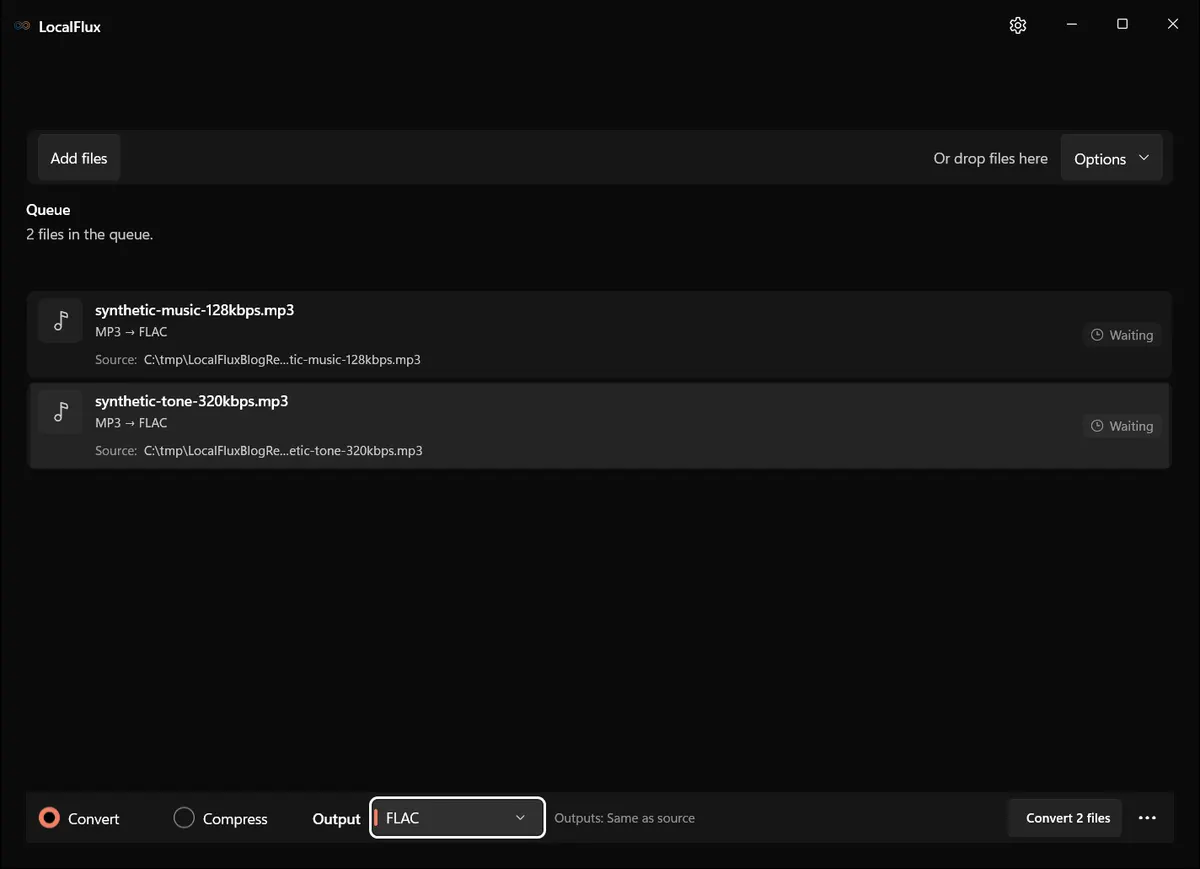
Interface screenshots were refreshed in October 2026 using a build reconstructed from the documented LocalFlux 1.0.10.0 release source. Historical measurements and downloads below retain their original test scope. Capture records: 1
The selected route was MP3 → FLAC, with output written beside the source fixtures.
Both conversions completed. The 128 kbps MP3 grew from 192,813 bytes to 3,406,212 bytes, an increase of 1,666.59%. The 320 kbps mono MP3 grew from 362,623 bytes to 1,130,043 bytes, an increase of 211.63%.
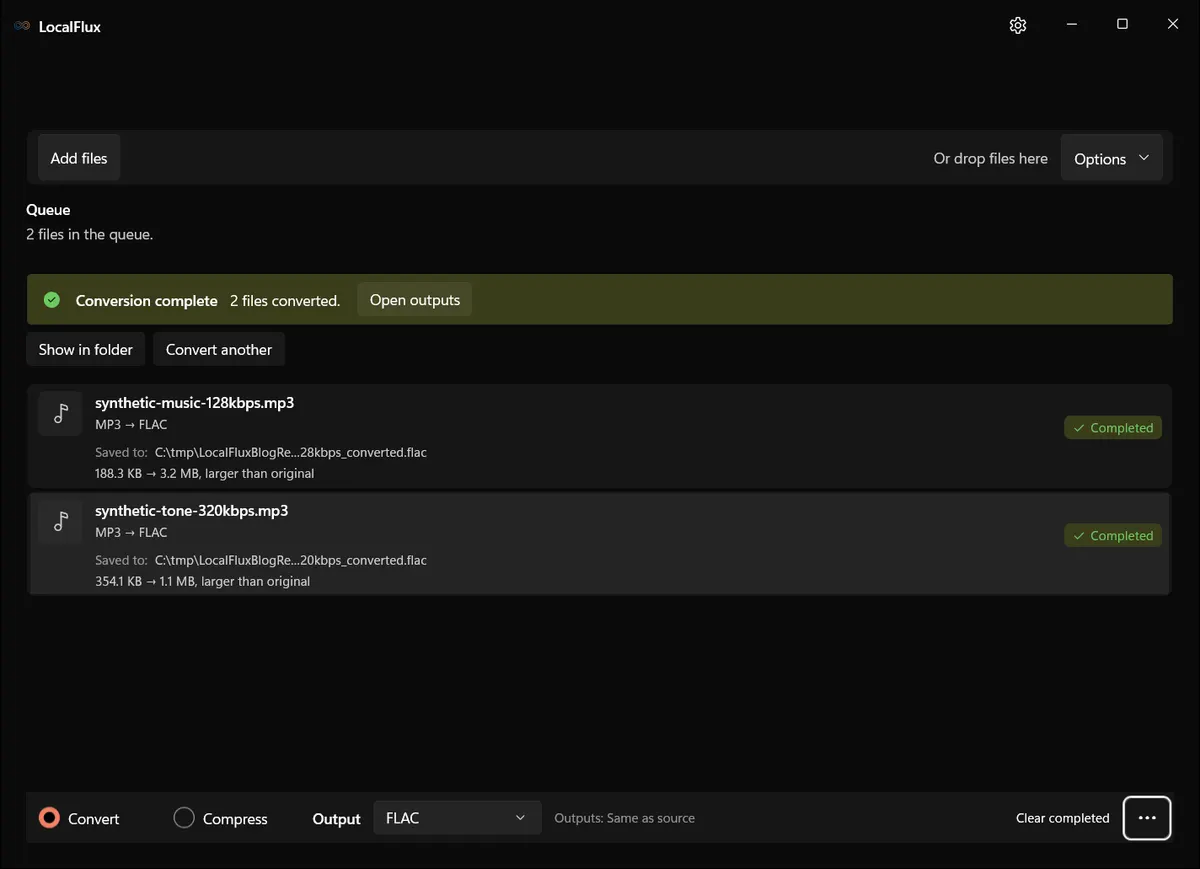
The different percentage increases are not quality scores. FLAC file size depends on duration, channels, sample rate, bit depth, and how predictable the decoded waveform is. MP3 size is driven heavily by its bitrate and duration. The important observation is that the output became much larger in both cases.
The null test: did the decoded signal change?
Recheck on 13 October 2026: we decoded each retained MP3, FLAC and WAV master to 64-bit floating-point PCM with the FFmpeg bundled in the reconstructed 1.0.10.0 capture build. We subtracted corresponding samples without forced resampling. Both music files decoded to 576,000 samples per channel; both tone files to 396,900. The table reports peak and RMS residual levels in dBFS.
| Comparison | Music: peak / RMS | Tone: peak / RMS |
|---|---|---|
| MP3 − FLAC | -138.541923 / -144.279572 | -138.495030 / -143.391803 |
| WAV − MP3 | -32.574482 / -39.720870 | -96.836055 / -109.687946 |
| WAV − FLAC | -32.574471 / -39.720870 | -96.818091 / -109.685684 |
The MP3–FLAC difference is small but nonzero. FLAC contains 24-bit integer PCM; the result is consistent with quantization between floating-point decoding and integer storage, but this check does not isolate every source of rounding. The old perfect-null figures remain in the historical test record and were not reproduced here. These are numerical comparisons, not listening scores or a codec ranking. The master comparison shows no recovery of discarded source information.
Why the FLAC can look “higher quality” in file properties
After conversion, an inspector may report FLAC, a high sample rate, 24-bit samples, or a much higher effective bitrate. Those fields describe the storage representation, not newly created musical detail.
For example, an encoder can decode a 128 kbps MP3 to 48 kHz PCM and write those samples into a multi-megabyte FLAC. The FLAC’s bitrate is high because lossless PCM storage requires more data than the perceptual MP3 representation. It does not mean the source suddenly gained the frequency detail, transient precision, or masking decisions removed earlier.
Likewise, converting a 16-bit decoded signal to a 24-bit container adds numerical space, not source resolution. The extra low-order bits cannot be filled with the original recording information unless that information is available from another source.
Metadata can also be misleading. A library manager may label every FLAC “lossless,” which is technically true about the FLAC encoding stage but says nothing about whether the audio was previously lossy. Provenance matters more than the current extension.
When MP3 to FLAC is still useful
Editing without another MP3 generation
Many audio editors decode MP3 internally while you work. If your only source is MP3 and you expect several edit/export cycles, converting once to FLAC or WAV can create a stable working file. Subsequent lossless saves do not repeatedly apply MP3 encoding.
This does not improve the starting audio. It prevents avoidable additional damage during the workflow. Export the final delivery format once at the end.
A device or application requires FLAC
Compatibility requirements can justify conversion. A playback system, archive tool, analysis pipeline, or editing application may accept FLAC more reliably than MP3. The derived FLAC can preserve the decoded input while satisfying that requirement.
You need sample-accurate processing
Some command-line and scientific tools operate more predictably on a lossless PCM container. Converting to FLAC provides deterministic decoded samples, smaller storage than uncompressed WAV in many cases, checksums, and tagging support. Again, it is a workflow benefit rather than a fidelity upgrade.
You are consolidating a temporary project
An editor may choose FLAC as a common intermediate for a mixed collection of MP3, AAC, and other sources. That can simplify the project, but the asset catalog should retain source-quality labels so a derived FLAC is not mistaken for a lossless original.
When you should not convert
Do not convert an MP3 library to FLAC merely to “future-proof the quality.” You will spend more storage while preserving the same audible information. Keep the MP3s and seek truly lossless sources for albums that matter.
Do not convert before sending audio to a person who prefers MP3. The larger FLAC adds transfer time and may fail device compatibility without improving the source.
Do not use MP3 → FLAC to satisfy a distributor or archive that requires lossless masters. A derived FLAC may meet the file-extension check while failing the actual provenance requirement. Return to the original recording, DAW session, CD rip, or verified lossless purchase.
Do not convert MP3 → FLAC → MP3 expecting a clean refresh. The final MP3 is a new lossy generation. Even at the same bitrate, it can add artifacts because the second encoder works from the already altered waveform.
How to convert MP3 to FLAC offline in LocalFlux
If one of the legitimate workflow cases applies:
- Open LocalFlux and choose Convert.
- Add the MP3 files. Batch files with similar project needs together.
- Open the output menu and select FLAC.
- Choose the destination. Keeping output beside the source is convenient, but a separate working folder reduces confusion.
- Start the queue and wait for every file to show Completed.
- Open the output and confirm duration, channel count, sample rate, tags, and playback.
- Label the file as “FLAC derived from MP3” in project notes or metadata.
LocalFlux performs the conversion on the Windows PC and leaves the MP3 unchanged. Keeping the source is essential: it is smaller, it documents the real provenance, and it may be all you need later.
How to get a genuinely higher-quality FLAC
Start from a higher-quality source. Good options include the original WAV or AIFF export, the DAW project rendered without lossy encoding, a secure CD rip, or a verified lossless download. Convert that source directly to FLAC.
If you have both an MP3 and a supposed lossless file, do not judge only by extension or file size. Check provenance, obtain checksums when available, inspect codec metadata, and, when the stakes justify it, perform spectral and null comparisons. Spectral cutoffs can be clues but are not proof by themselves; some legitimate sources have limited bandwidth, and some lossy encoders preserve high-frequency noise.
For the opposite, intentional delivery workflow, see convert FLAC to MP3 on Windows. If your source is an uncompressed master, WAV to MP3 on Windows explains how to make a compatibility copy while keeping the master.
Record provenance so a derived FLAC is not mistaken for a master
File libraries outlive the conversion session. A person who sees only track.flac next year may reasonably assume it came from a lossless source. Prevent that mistake with a simple provenance record.
Keep the original MP3 beside the working FLAC or in a protected source folder. Include “derived-from-mp3” in the project notes, asset database, or filename when that is compatible with the workflow. Record the source filename, its checksum, the conversion date, and the tool/version. If tags are edited after conversion, distinguish descriptive metadata changes from changes to the audio stream.
For a large collection, do not merge derived FLACs and verified lossless rips into one unlabeled tier. Separate them by source class. That makes later deduplication, transcoding, and replacement work much easier. When a genuine lossless edition becomes available, you can identify which derived file should be retired without relying on spectral guesses.
This recordkeeping does not change sound quality, but it protects the most important quality fact: where the audio came from.
Frequently asked questions
Can software or AI restore what MP3 removed?
Enhancement tools can estimate or synthesize plausible content, reduce noise, or mask artifacts. That may sound preferable, but it is not restoration of the exact discarded samples. An ordinary format conversion does not perform that kind of generative reconstruction.
Is FLAC always lossless?
FLAC encoding and decoding are lossless relative to the samples supplied to the FLAC encoder. A FLAC can still be derived from MP3, a low-quality recording, or another lossy source.
Will MP3 to FLAC make editing easier?
Often, yes. Editors can work with a lossless intermediate without adding more MP3 generations. That is a production advantage, not an improvement to the first decoded waveform.
Why did my FLAC become ten times larger?
MP3 uses perceptual lossy compression. FLAC must losslessly represent the complete decoded PCM stream. A large increase is expected and varies with the content and stream parameters.
Should I convert 320 kbps MP3 to FLAC?
Only for compatibility or a lossless editing intermediate. A high-bitrate MP3 can already sound excellent, but putting it in FLAC does not turn it into a lossless master.
MP3 to FLAC can provide a useful working file without another MP3 generation. It does not restore discarded audio, and exact decoded identity depends on the decoder and sample representation.
Publication evidence
Technical references
The format guidance above is checked against these independent specifications and platform references.
- RFC 9639: Free Lossless Audio Codec (FLAC), RFC Editor